
The best managed WordPress hosting providers offer reliable and hassle-free hosting for WordPress sites. The top recommended managed WordPress host is Hostinger. It offers global data centers, 1-click WordPress installation, LiteSpeed support, and automatic updates.
Managed WordPress hosting refers to WordPress hosting that includes managed services. WordPress hosting is a specialized type of hosting that is optimized for websites built on the WordPress Content Management System (CMS). Managed WordPress hosting works by having the host provider take care of tasks such as WordPress updates, site optimization, security monitoring, and backups. Unlike regular WordPress hosting, managed WordPress hosting therefore offloads routine and complex server management and optimization tasks to the host. The cost of managed WordPress hosting ranges from $5 to $50 per month, with viable cheap options available.
The 6 benefits of using managed WordPress hosting are higher speed, enhanced security, automatic daily backups, expert WordPress support, user-friendliness, and the provision of local WordPress development suites.
The 3 limitations of managed WordPress hosting are its higher cost, restricted server control, and compatibility with the WordPress CMS only. Users for whom site speed is a top priority are recommended to choose fast managed WordPress hosts that deliver global server response times under 180 ms.
Despite its more hands-off nature, Managed WordPress hosting allows users to retain some flexibility. You are still able to install WordPress plugins by yourself and to migrate to different hosting plans in future.
Many users start with Managed shared WordPress hosting and upgrade to more scalable forms when their website grows, such as Managed WordPress VPS (Virtual Private Server) hosting or Managed WordPress cloud hosting. There is also managed WooCommerce hosting, which is WordPress hosting that’s optimized for the WordPress eCommerce plugin WooCommerce.
Top Managed WordPress Hosting
- Hostinger – Best for affordable managed WordPress hosting
- Names.co.uk – Best managed WordPress hosting for human support
- Kinsta – Best for premium managed WordPress hosting
- UltaHost – Best for managed WordPress hosting with NVMe
- DreamHost – Best managed WordPress hosting for beginners
- Cloudways – Best for cloud-based managed WordPress hosting
- HostPapa – Best for managed WordPress hosting for small businesses
- WP Engine – Best managed WordPress hosting for 100% uptime
- Bluehost – Best managed WordPress hosting for the US
- TMDHosting – Best secure WordPress hosting for global sites
- What Is Managed WordPress Hosting?
- What Is The Cost Of Managed WordPress Hosting?
- What Are The Benefits Of Using Managed WordPress Hosting?
- What Are The Limitations Of Using Managed WordPress Hosting?
- What Makes A Fast Managed WordPress Hosting?
- Can I Install Plugins On Managed WordPress Hosting By Myself?
- Can I Migrate Away From Managed WordPress Hosting?
- What Can I Do When I Outgrow The Managed WordPress Hosting?
- What Is Managed WooCommerce Hosting?
- Which Is The Best Managed WordPress Hosting?
A quick note on speed
We’ve ranked every host’s speed using Bitcatcha Server Speed Checker. It records response time from ten locations around the globe and calculates the average. Scores below 180 ms are ranked “A+” and scores from 181 ms to 210 ms will be ranked “A.”

1. Hostinger
Hostinger is one of our favorite hosts and they’ve come a LONG way from just being known as ‘the cheapest host around.
In fact, our research found Hostinger to be the Most Sought-After Web Host of 2020! Today, they provide premium-level performance and support at prices that are still surprisingly affordable. Oh – and they’re perfect for WordPress.
Hostinger is now the most popular hosting brand for managed WordPress hosting in the world! No thanks to the following features:
- Use their easy 1-click WordPress installer.
- Convenient pre-installed WordPress plugins and marketing tools.
- You’ll manage everything from the hPanel (a more user-friendly version of cPanel)
- Let their team handle automatic WordPress updates for you.
Your WordPress site performance ALSO gets a nice boost thanks to things like NGINX caching, LiteSpeed cache, and PHP7.4 support. The result is some of THE fastest loading speeds we’ve ever seen on our speed tests!
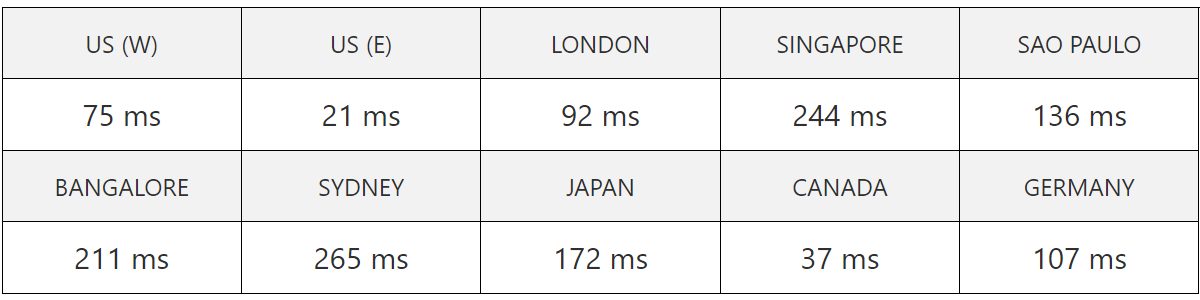
US Datacenter Average Speed: 136 ms – See full result
Another thing that has always made Hostinger stand out is how global their servers and support team are. They have 10 data centers worldwide, which means you can simply host from the one that’s closest to your audience and enjoy the speediest of high speeds. It’s not something you’d usually expect at their low price point, but hey – we’ll take it.
Overall, Hostinger offers amazing value for WordPress site owners. For $2.99 a month (on the 48-month plan), you get a ton of value. Find out more at our full Hostinger review.
Hostinger offers 4 pricing tiers for managed WordPress hosting:
- Single WordPress – $1.99 per month
- WordPress Starter – $2.99 per month
- Business WordPres – $3.99 per month
- WordPress Pro – $11.59 per month
Hostinger has a couple of drawbacks, starting with the lack of free daily backups, although free weekly backups are available and might suffice for many users. Furthermore, their low rates are only applicable if you opt for a longer subscription period of 48 months, which might not suit everyone.

2. Names.co.uk
Names.co.uk managed WordPress hosting removes a lot of the manual setup work that usually comes with launching and maintaining a WordPress site. WordPress comes pre-installed, and plans include an AI Site Assistant which helps generate a starter site layout and content from simple text prompts. Their free premium website transfer is included for users moving an existing WordPress site across to Names.co.uk.
Names.co.uk also handles the ongoing WordPress maintenance layer. Its Managed WordPress plans include WordPress, plugin, and PHP updates, hourly backups, 1-click restore, malware scanning and removal, and performance support. Users also get free SSL, a free domain name, and test environments for safely checking WordPress changes before publishing them.
The entry Managed WordPress Starter plan includes 30GB SSD web space, a 1GB database, unlimited data traffic, 1 mailbox with 2GB storage, and 1 test environment. Higher-tier plans increase storage and support up to 3 test environments. They also provide fantastic UK-based customer support through tickets and phone support. Names.co.uk’s data centers are powered by 100% renewable energy. Learn more in our detailed Names.co.uk review.
Names.co.uk offers 3 pricing tiers for managed WordPress hosting:
- Starter – $1.33 per month for the first month, then $14.73 per month
- Professional – $30.82 per month
- Premium – $57.63 per month
Names.co.uk’s renewal prices increase significantly after the first month, and there is no standard 30-day money-back guarantee.

3. Kinsta
Kinsta’s big selling point is that it’s powered by Google Cloud, which they claim makes them faster than their competitors. We certainly were impressed with the speed of our Kinsta-hosted test site, which scored an A+ rating. They provided super fast response speeds across the US. They’re also the host of choice for Ubisoft and Asos, so they are no stranger to demanding clients.
Their smallest package costs $100 $35 – updated Jun 2022 – so Kinsta is an option tailored for businesses, bigger sites, and higher budgets.
But if you need that much power, Kinsta has it in bucketloads. The service checks your website once a minute for security and support. You can choose your own CDN. and boasts all the developer tools you could want (including a bespoke dashboard that is beautiful and intuitive).
In terms of support, Kinsta’s team responds quickly to our tickets, and clearly knows their stuff when it comes to all things WordPress. Their entire support team is composed of high-level WordPress developers and experts, which should help you resolve any issues quickly. You’re in safe hands here. See our detailed Kinsta review.
Kinsta offers 3 pricing tiers for managed WordPress hosting:
- Starter – $30 per month
- Business 1 – $115 per month
- Enterprise 1 – $675 per month
Kinsta is more expensive than many other hosts on this list, with their smallest plan starting at $35 per month. Additionally, they don’t offer email hosting and instead recommend using G Suite, which starts at $6 per month for the Basic plan.

4. UltaHost
UltaHost offers a robust managed WordPress Hosting solution tailored for businesses of all sizes. It’s powered by cutting-edge NVMe SSD storage and LiteSpeed technology, which provides an optimized environment for WordPress sites and delivers speeds up to 5x faster than competing services.
Users easily get started with their 1-click WordPress installation feature. Their managed plans also give you access to expert support via live chat, tickets, voice calls, email, and their knowledgebase. The inclusion of advanced caching, unlimited bandwidth, and regular automated backups ensures a fast and reliable online presence.
UltaHost’s intuitive WordPress Manager simplifies plugin management, updates, and migrations, which makes it a favorite among beginners and experts alike. Its data centers across 6 continents ensure low-latency performance for global audiences. Find out more in our full UltaHost review.
UltaHost offers 4 pricing tiers for managed WordPress hosting:
- Ulta WordPress – $2.80 per month
- WordPress Starter – $4.50 per month
- Business WordPress – $6.50 per month
- VPS WordPress – $23.80 per month
UltaHost offers a free domain, but only for annual plans. Accessing advanced features also requires some technical knowledge.

5. DreamHost
DreamHost make it dead easy for anyone – even total beginners – to build, launch and manage a WordPress site. Their Managed WordPress plans – aptly named ‘Dreampress’ – are pretty unbeatable in terms of value and ease. They’re also one of the few hosts with an official WordPress endorsement!
Typically, anyone looking for Managed WordPress hosting wants something as hands-off as possible. DreamHost has essentially thought of every possible annoying part of running a website – whether that’s designing it or updating the latest security patches – and takes it off your shoulders. You can then focus on the important business of growing your business.
All of DreamHost’s plans give you automated backups (to keep your site safe), built-in caching (no need to implement anything) and free site migrations. Their team is highly-trained in WordPress and manages all your security updates and server optimization, so your site stays safe and speedy without you needing to think twice about it.
How speedy? We set up 2 WordPress test sites on DreamHost and ran them through our speed checker tool to find out.
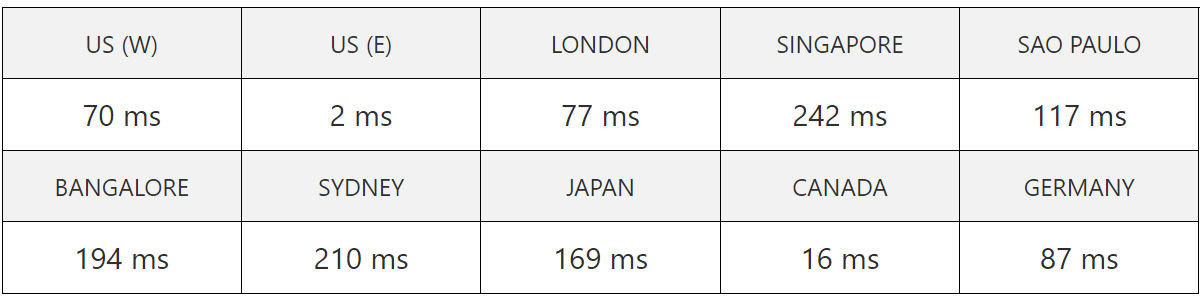
US Datacenter Average Speed: 118.4 ms – See full result
They scored a top-notch A+ ranking and were the fastest hosts on this list! As expected, server loading speeds got slower in regions that were further away from their data centers (both in the US). But if your audience is based near the Americas, your WordPress site should be lightning-fast. Read our complete DreamHost review for more information.
DreamHost offers 3 pricing tiers for managed WordPress hosting:
- DreamPress – $16.95 per month
- DreamPress Plus – $24.95 per month
- DreamPress Pro – $71.95 per month
DreamHost’s lack of data centers outside the US can result in slower speeds for audiences in Asia or Oceania, although their average worldwide speed remains impressive. Additionally, live chat support is only available from 5:30 AM to 9:30 PM Pacific Time, but they do offer a 24/7 ticketing system for round-the-clock assistance.

6. Cloudways
Cloudways is a managed cloud hosting provider. It’s a little different from many traditional web hosts in that you can choose to deploy WordPress through Cloudways on the cloud of your choice, like AWS, Digital Ocean and Linode. Cloud hosting is much more powerful and reliable than traditional VPS.
As for features, Cloudway’s managed WordPress hosting comes with 24/7 support and free migration across all packages. Advanced options come with GIT integration, staging URLs, and managed backups. There’s also an intuitive and user-friendly control panel – something that a lot of cloud hosts don’t have. We also just love their pay-as-you go model – it’s much more flexible than most pricing plans. See our full Cloudways review to learn more.
Cloudways offers 5 pricing tiers for managed WordPress hosting:
- Digital Ocean – starting from $12 per month
- VULTR – starting from $13 per month
- Linode – starting from $12 per month
- AWS – starting from $36.51 per month
- Google Cloud – starting from $33.18 per month
Cloud hosting with Cloudways can be somewhat technical, but their user-friendly control panel helps ease the process. However, since Cloudways is built on top of other cloud hosting providers, they have limited control over the underlying hardware.

7. HostPapa
Coming in next is HostPapa, a hosting solution hailed from Canada.
We’ve been impressed with them for years and their server speeds have consistently scored top A+ scores on our speed test tool. So we were happy to see them launch Managed WordPress plans in 2022! Finally!
With 3 fast data centers in the US, Canada and Amsterdam, and budget-friendly prices, we think HostPapa makes for a great no-frills optimized WordPress solution.
They’ve piled lots of great features into their interface, so you won’t need to fuss around and look for / pay for extra plugins for your WordPress site. Highlights include:
- Being able to automate CDN configuration, core updates, plugin updates and more by default or in a few clicks
- Optimizing your site performance with Full Page Caching
- Free WordPress site migrations
- Software boosters like WordPress Super Caching to help speed up site loading
HostPapa also offers great security features packaged up into their ‘Website Security Suite’ that gives you enterprise-grade WordPress protection. For one – you get not one, but two firewalls PLUS real-time malware scanning and offsite daily backups made automatically.
Finally – we just love their support team, AKA the PapaSquad. They’re highly trained in WordPress and you can even schedule a 30-minute training session with them to answer any WordPress or website questions you have! Find out more at our full HostPapa review.
HostPapa offers 3 pricing tiers for managed WordPress hosting:
- Launch – $19.95 per month
- LaunchPlus – $39.95 per month
- LaunchPro – $69.95 per month
HostPapa’s lack of data centers near Asia or Australia may result in slower speeds for users with audiences in those regions.

8. WP Engine
WP Engine are perhaps the biggest name in managed WordPress hosting. They were one of the first to offer it, and now provide hosting for Cancer Research, Rightmove, HTC and a variety of other big-name clients.
The entry level option, ‘Startup’ is generous, offering a staging environment, one click backup, and free site migration. It’s perfect for up to 25,000 visitors per month, but you’ll have to upgrade to unlock more resources and 24/7 phone support.
Their server is located on the East Coast of the US, so the server speed is faultless if your audience is based there. I also love their 60-day money-back guarantee, so if it’s not working out, you can simply cancel it. In short, it’s very solid and extremely easy to use – even for newbies. Read our WP Engine review to find out more.
WP Engine offers 4 pricing tiers for managed WordPress hosting:
- Startup – $20 per month
- Professional – $44 per month
- Growth – $113 per month
- Scale – $275 per month
WP Engine has a list of prohibited plugins, so it’s important to review this list before committing. Additionally, 24/7 support is only available to premium customers, which may be a limitation for some users.

9. Bluehost
A complete managed WordPress host isn’t the right option for everyone, particularly newer or smaller websites. In that case, a cheaper option will be more than adequate. And Bluehost is one of the best budget options out there.
Their speed is consistently fast across the US and is especially zippy from the West Coast – coming in at 23 ms! And whilst we wish it had more data centres around the world (there’s only one in the US, and in India), their global average speed is still very decent at 153 ms.
It’s secure, and 24/7 customer support is available as standard. Unlike some hosts like Inmotion Hosting with no CDN included, Bluehost supports Cloudflare.
Plus – Bluehost has been is recommended by WordPress.org since 2005! Find out more at our Bluehost review.
Bluehost offers 3 pricing tiers for managed WordPress hosting:
- Build – $19.95 per month
- Grow – $29.95 per month
- Scale – $49.95 per month
Bluehost doesn’t offer free site migration, and there have been reports of slow load speeds and delayed support responses, which are important considerations for potential users.

10. TMDHosting
TMDHosting leverages a cloud infrastructure of CloudLinux servers to ensure high speed and reliability for all hosted WordPress sites. Its 6 data centers spread across all major continents optimize site performance no matter where your audience is. This is crucial for WordPress sites with international traffic.
TMDHosting’s Business plan offers a compelling package for WordPress users at $4.99 per month. This fully managed solution is powered by the cPanel WordPress tool kit, which includes 1-click WordPress installs and automated WordPress version and security updates.
All TMD plans include cutting-edge security measures like real-time malware scanning with Imunify360 and robust DDoS protection courtesy of Cloudflare. Users also get a free SSL certificate to protect all website and customer data.
Their customer support team is available 24/7/365 and guarantees a 15-minute response time. TMD also offers complimentary WordPress site migrations, which is a nice bonus for those looking to switch from another host without the hassle. Check our full TMDHosting indepth guide for more details.
TMDHosting offers 3 pricing tiers for managed WordPress hosting:
- Starter – $2.99 per month
- Business – $4.99 per month
- Enterprise – $8.99 per month
TMDHosting’s Starter plan lacks free backups, which are only included in their Business and Enterprise plans. While TMD offers attractive introductory rates, prices increase significantly upon renewal, and you must subscribe to a yearly plan to access their lowest prices.
What Is Managed WordPress Hosting?
Managed WordPress hosting is a comprehensive service for effortlessly hosting and managing a WordPress site. It relieves users from technical burdens such as server maintenance and performance tuning. Such server-related tasks are managed by the WordPress hosting provider. This allows users to concentrate on creating content or growing their business.
How Does Managed WordPress Hosting Work?
Managed WordPress hosting works by having host providers actively manage important but technically tedious tasks on an ongoing basis. The web host’s support team takes care of WordPress updates (core, plug-ins and themes). The host also absorbs tasks like site optimizations, security monitoring, and routine backups. These operations work seamlessly in the background which allows site WordPress owners to remain hands-off.
How Is Managed Different from Regular WordPress Hosting?
Managed WordPress hosting is different from regular WordPress hosting because it shifts critical technical responsibilities from the user onto the web host. Users of managed WordPress hosting do not need to worry about maintaining their server. In regular (unmanaged) WordPress hosting, the user is responsible for staying on top of these tasks. Regular WordPress hosting users therefore need to have appropriate technical skills to keep their site safe and online.
What Is The Cost Of Managed WordPress Hosting?
The cost of managed WordPress hosting ranges from $5 to $50 per month. The exact figure depends on the level of host involvement and the exact managed services provided. This overall price range includes managed services and 24/7 access to a team of WordPress experts. You get key features like Nginx or LiteSpeed, Solid State Drives (SSDs) or NVMe storage. You also get PHP workers and multi-level caching across pages, databases, and server levels. The lower-priced Managed WordPress Hosting plans use shared hosting environments. The higher-end options offer cloud infrastructure.
Can I Use Cheap Managed WordPress Hosting?
Yes, you can use cheap managed WordPress hosting. This is ideal for budget-conscious individuals or small businesses who don’t want the hassle of routine website maintenance and upkeep. The cheapest hosting options come with limitations. This includes capped server resources, limited caching technologies, and the absence of WordPress staging environments.
What Are The Benefits Of Using Managed WordPress Hosting?
There are 6 benefits of using managed WordPress hosting. First, it offers higher speed with WordPress-optimized server stacks, caching, and CDNs. Second, security is enhanced through malware scanning, firewalls, DDoS protection, and automatic security patching. Third, automatic daily backups ensure WordPress site data is consistently saved and easily restorable. Fourth, expert WordPress support is available 24/7 for troubleshooting, performance optimization, and maintenance. Fifth, user-friendliness is improved with intuitive dashboards, one-click WordPress installation, and staging environments. Lastly, local WordPress development suites allow developers to build, test, and deploy WordPress sites efficiently from their own computers.
What Are The Limitations Of Using Managed WordPress Hosting?
There are 3 limitations of using managed WordPress hosting. The first limitation is the higher cost compared to regular hosting. This is because of the higher level of expertise and time-saving services provided. The second limitation is that users have less control over server configuration and plugins. The hosting provider manages these aspects to keep your site safe but this limits customization options for advanced users like WordPress developers. The third limitation is that this type of hosting is only for websites built using the WordPress CMS.
What Makes A Fast Managed WordPress Hosting?
Fast managed WordPress hosting is a service that delivers an average global response time of 180 milliseconds or below. This is achieved through various speed-enhancing features like using cloud hosting infrastructure for dedicated and scalable resources. Opcode caching and object caching for WordPress databases help enhance request processing. Fast managed WordPress hosting also uses content delivery networks (CDNs) to improve time to first byte (TTFB) worldwide. It also relies on SSD or NVMe SSD for faster data storage and retrieval.
Can I Install Plugins On Managed WordPress Hosting By Myself?
Yes, you can install plugins on managed WordPress hosting by yourself. You do this by navigating to the “Plugins” section of your WordPress dashboard. Note that most managed WordPress hosting providers restrict the installation of certain plugins. This restriction is for security and performance reasons since unstable or poorly-coded plugins can introduce vulnerabilities to your site. The restricted plugins are third-party ones and often related to caching, backup, and image optimization. Check with your hosting provider to see which specific plugins are restricted and cannot be installed by yourself.
Can I Migrate Away From Managed WordPress Hosting?
Yes, you can migrate away from managed WordPress hosting. This involves either migrating to a regular (unmanaged) WordPress plan of the same host, or to a new web host’s WordPress hosting. The migration process is handled by yourself or by seeing support from the web host. Most hosting providers offer WordPress migration assistance as part of their services.
What Can I Do When I Outgrow The Managed WordPress Hosting?
When you outgrow the Managed WordPress hosting plan you are using you can upgrade to a plan powered by VPS (Virtual Private Server) or cloud hosting. Both are scalable types of hosting that allow you to adjust the server resources (storage, bandwidth, CPU, RAM) allocated to your WordPress site. This flexibility allows for easy scaling in line with your WordPress site’s expansion.
How Scalable Is Managed WordPress VPS Hosting?
Managed WordPress VPS hosting is much more scalable than managed WordPress hosting in a shared environment. Managed WordPress VPS hosting is the combination of managed WordPress hosting and VPS hosting. VPS hosting utilizes a single physical server that is divided into multiple virtual servers each with its own resource set (CPU, RAM, and storage). You can easily scale these resources by upgrading or downgrading your VPS plan tier. The scalability of VPS plans is only limited by the available resources on a single server. Check our best managed VPS hosting shortlist for our brand recommendations.
How Scalable Is Managed WordPress Cloud Hosting?
Managed WordPress cloud hosting offers the highest level of scalability among all Managed WordPress hosting options. Managed WordPress cloud hosting refers to managed WordPress services powered by cloud hosting. Cloud hosting lets a website pull resources from a network of interconnected servers. The scalability of cloud hosting plans is only limited by the total number of physical servers owned by the providers. Cloud hosting is unique for its reactive scalability. This means the server resources can automatically adjust based on the incoming traffic. This ensures optimal performance at all times.
What Is Managed WooCommerce Hosting?
Managed WooCommerce hosting is a type of managed WordPress hosting that comes pre-installed with the WooCommerce plugin. WooCommerce is a powerful eCommerce plugin that enables users to turn their WordPress sites into fully functional online stores. It offers a range of features for selling products and services, managing inventory, and processing payments. Managed WooCommerce hosting thus offers a convenient hosting solution for online merchants.
How Does WooCommerce Benefit from Managed WordPress Hosting?
WooCommerce benefits from managed WordPress hosting in three ways. Firstly, it automates WooCommerce testing. This means the web host runs regular checks to ensure critical functions like checkout, login, and payment processing are always operational. Secondly, it actively monitors and patches WooCommerce-related vulnerabilities. This offers protection even before official software security updates are released. Finally, it ensures that WooCommerce sites meet Payment Card Industry standards (PCI). This is crucial for securely processing credit card transactions and protecting customer data.