
Hostinger Horizons is a game-changing AI-powered software development tool that helps users build and deploy browser-based web apps without code. This review explores everything you need to know. We begin by explaining what Hostinger Horizons is and who it’s designed for. Then we break down its pros and cons, walk through how the tool works, and cover the core technologies it uses to build your apps. We also address prompt guidelines (including supported languages and length tips) and clarify how its pricing and message-based plans work. You learn what kinds of apps you can and cannot build with Horizons, how hosting is included, and how the service compares to both Hostinger’s Website Builder and its traditional hosting plans. We also outline available help resources, refund eligibility, export options, and whether you’re able to use Horizons projects on other hosting providers. Lastly, we cover frequently asked questions and offer our final verdict on whether Hostinger Horizons is a good choice for your next project. Let’s dive in.
Table of contents
- What Is Hostinger Horizons?
- How Does Hostinger Horizons Work?
- What Technologies Does Hostinger Horizons Use for Building?
- What Languages Can I Use for Prompting in Hostinger Horizons?
- Is There a Prompt Length Limit in Hostinger Horizons?
- What Are the Plans and Pricing of Hostinger Horizons?
- What Can I Build Using Hostinger Horizons?
- What Help Resources Are Available in Hostinger Horizons?
- What Are the Frequently Asked Questions About Hostinger Horizons?
- What Is the AI Model That Powers Hostinger Horizons?
- Can I Import Code to Be Used on Hostinger Horizons?
- Can I Export Code Generated by Hostinger Horizons?
- Does Hostinger Horizons Allow Collaboration?
- What Is the Refund Policy of Hostinger Horizons?
- Can I Use Hostinger Horizons With Other Web Hosts?
- Hostinger Horizons vs Hostinger Website Builder: What’s the Difference?
- Hostinger Horizons vs Hostinger Hosting Services: What’s the Difference?
- Verdict: Is Hostinger Horizons Recommended?
What Is Hostinger Horizons?
Hostinger Horizons (Horizons) is an AI-powered software development tool designed to help users easily build and launch web applications by entering natural language prompts into a chatbox. These written instructions are converted into functional web applications that are seamlessly pushed online once ready. The tool dramatically simplifies web development for non-technical users by removing the need for manual coding, and integrating seamlessly with established hosting, domain and email technologies.
Hostinger Horizons is a proprietary product from Hostinger, a Lithuania-based web hosting provider with 20+ years of experience in the industry. Hostinger Horizons was officially launched as part of Hostinger’s broader product suite in 2025.
Who Should Use Hostinger Horizons?
Four types of users should use Hostinger Horizons. The first are entrepreneurs and founders. Horizons helps them turn business ideas into working products without needing to hire developers or learn code. Business owners are able to launch business-viable prototypes in minutes by simply describing what they want. The second are product and UX (User Experience) designers. Horizons allows designers to quickly test flows, validate concepts, and generate live MVPs (minimum viable products) without waiting on development cycles or handoffs. The third are product teams. Horizons speeds up collaboration and experimentation by letting teams build internal tools or customer-facing apps directly from natural language prompts. The fourth are developers. While Horizons is not meant to replace full-code development projects, it is useful for rapidly scaffolding ideas and exporting code to be customized further.
Hostinger Horizons Pros and Cons
Pros of Hostinger Horizons
- Easy AI prompt-based app creation with no coding required
- Supports 80+ languages for global usability
- Built-in hosting, domain, email, and security tools included
- Integrates with Stripe and Supabase for real payment and database support
- Fast one-click deployment for live web apps
- Free trial and 30-day refund policy
- 24/7 expert support in multiple languages
- Works well for MVPs, side projects, and small tools
- Flexibility to host apps outside of Hostinger’s ecosystem
Cons of Hostinger Horizons
- Limited message counts per month on all paid plans
- Not suited for large-scale or complex enterprise apps
- No phone or live call-based support
- Collaboration features are currently limited
- Pricing adds up if you exceed message caps regularly
• Launch your project without writing a single line of code
• 30-day money-back guarantee applies to accounts with fewer than 30 credits used
How Does Hostinger Horizons Work?
Hostinger Horizons works in 3 simple steps upon launching. The first step is to describe what you want to build by typing a prompt into the Hostinger Horizons AI chat interface that explains what kind of app, site, or tool you wish to create. This is as simple as “a sales tracker for a small business” or “a personal portfolio with contact form.” Horizons immediately generates a working prototype based on your description.
The second step is to refine and customize the project. Once the app is created, continue chatting with the AI to make changes. Example changes include adding features, adjusting layout, or updating copy. You’ll see real-time updates in a live preview. Horizons also supports image uploads, voice prompts, and multilingual input for more personalized development.
The third step is to publish your app. Hostinger Horizons allows you to instantly deploy your app to a custom domain using the built-in hosting with one click. All Hostinger Horizons plans include integrated hosting, domain setup, and email tools, so there’s no need to connect external services. You’re able to redeploy at any time as you continue improving your app.
What Technologies Does Hostinger Horizons Use for Building?
The technologies Hostinger Horizons uses for building include Node.js, React and Vite. Node.js provides the development environment for running and managing the build process, while React is used to create the user interface and Vite handles fast bundling and compilation of the application. Once your Hostinger Horizons project is ready for deployment, it is compiled into static HTML, CSS, and JavaScript files. These files are then hosted on Hostinger’s shared or cloud infrastructure, ensuring fast performance and simple deployment.
What Languages Can I Use for Prompting in Hostinger Horizons?
You can use one of 80+ languages for prompting in Hostinger Horizons. The full list of supported languages isn’t published, but coverage includes major global languages like Spanish, Mandarin, and Arabic. Prompting in English is recommended for the highest accuracy in AI interactions.
Is There a Prompt Length Limit in Hostinger Horizons?
No, there is no strict prompt length limit (character or word limit) in Hostinger Horizons, but the platform recommends keeping your initial prompt to 2 to 5 sentences. This helps provide enough context for the AI to generate a functional starting point. Following this, it’s best to issue one change request per prompt to ensure accurate updates and smoother edits.
What Are the Plans and Pricing of Hostinger Horizons?
The plans and pricing of Hostinger Horizons start at $6.99 and go up to $79.99.
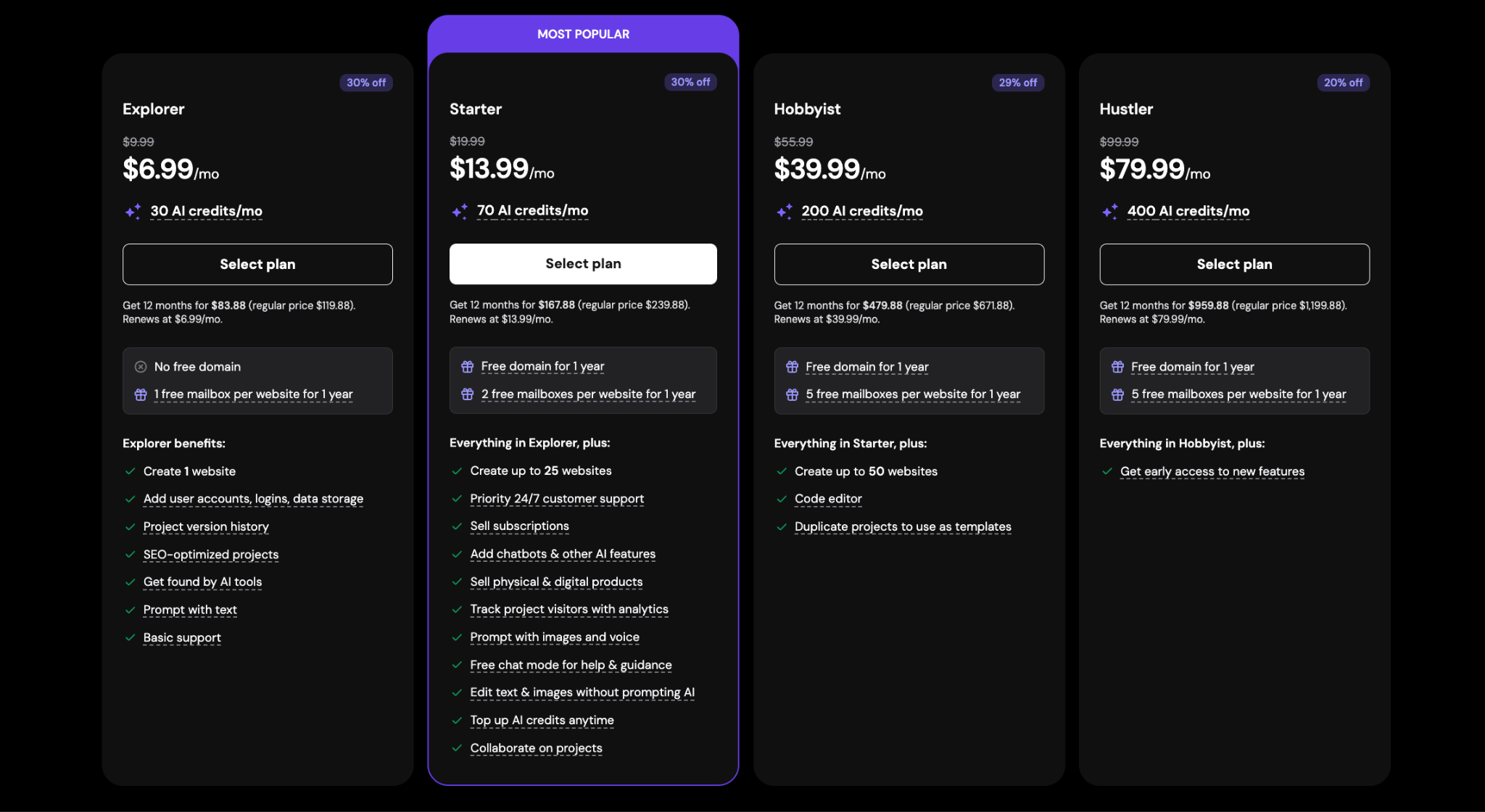
There are 4 Hostinger Horizons plans. The first is the Explorer plan at $6.99/month. It includes 30 AI credits per month and suits light usage or simple idea testing. The second is the Starter plan at $13.99/month. It offers 70 monthly AI credits and is geared toward students and beginners. The third is the Hobbyist plan priced at $39.99/month. It comes with 200 AI credits a month and is ideal for freelancers or creators building side projects. The fourth is the Hustler plan at $79.99/month. It allows 400 AI credits per month and is tailored for startups, teams, and more frequent use. All plans include 50 projects, editing tools, and AI error fixing. Users are billed annually and have the option to cancel anytime.
Does Hostinger Horizons Include Hosting?
Yes, all Hostinger Horizons plans include hosting, with the first month provided free. Hosting refers to the service of making your web application accessible online by serving its compiled files (HTML, CSS, and JavaScript) to users when they access it through a browser. Hostinger Horizons integrates directly with Hostinger’s global network of hosting servers, allowing users to deploy fully functional web apps without needing to procure a separate hosting subscription or manage servers manually.
Is Hostinger Horizons Included in Their Hosting Services?
Yes, Hostinger Horizons is included in their hosting services. This means existing Hostinger hosting subscribers are able to access Hostinger Horizons for free, with a daily limit of 5 AI messages. Users who need higher usage must upgrade to a paid Horizons subscription plan to increase their message allowance.
• Price starts from $6.99/mo. 30 AI credits per month included
What Can I Build Using Hostinger Horizons?
You can use Hostinger Horizons to build web applications (web apps) across five common categories. The first is a productivity or planning tool, such as a daily habit tracker, time manager, and brainstorming boards. The second is a dashboard or tracker that visualizes data like personal finances, social media metrics, and uptime monitoring. The third is a wellness or lifestyle app, including journaling tools, sleep schedulers, and fitness logs. The fourth includes learning and entertainment apps, such as gamified language platforms and simple browser-based games like Snake and Tetris. The fifth is side-hustle tools and MVPs, like budget calculators or content planners.
What Can’t Hostinger Horizons Build?
Hostinger Horizons can’t build highly-complex or production-level software. There are three types of project that they recommend avoiding. The first are mobile apps, as Horizons does not currently offer mobile app development for iOS or Android. The second are mobile apps requiring advanced monetization, since this is currently difficult to prompt. However, it is possible to add simple monetization features including subscriptions, one-time payments, ads and affiliate links. The third are web apps requiring authentication, which is also difficult to prompt within the Horizons interface.
What Help Resources Are Available in Hostinger Horizons?
There are 3 help resources available in Hostinger Horizons. The first is official user guides, which include step-by-step tutorials for setup, prompting, publishing, and troubleshooting. The second is the official Discord server, where users share ideas, ask questions, and get feedback from both peers and the Hostinger team. The third is live chat support, which offers 24/7 assistance for technical or product-related issues.
What Are the Frequently Asked Questions About Hostinger Horizons?
There are 8 frequently asked questions about Hostinger Horizons:
What Is the AI Model That Powers Hostinger Horizons?
Hostinger has not officially disclosed the specific AI model that powers Hostinger Horizons. The platform runs on modern large language models (LLMs) to generate code, design, and content, but the underlying provider or architecture remains unspecified.
Can I Import Code to Be Used on Hostinger Horizons?
No, you cannot import code to be used on Hostinger Horizons. This means you cannot upload custom scripts, integrate GitHub repositories, or bring in third-party code. Everything must be created and modified through Horizons’ built-in AI prompt interface.
Can I Export Code Generated by Hostinger Horizons?
Yes, you can export code generated by Hostinger Horizons. Horizons lets you export your project’s full codebase as a downloadable .zip file. The exported code is a Node.js project built with React and Vite. You’re able to access this option through the Settings menu inside the Horizons editor. Once exported, you’re able to run or modify the code manually on your local machine, deploy it on a VPS (Virtual Private Server) with Node.js support, or convert it into static files (HTML, CSS, JS) for use on shared or cloud hosting. Keep in mind it is not possible to re-import the project into Horizons once exported.
Does Hostinger Horizons Allow Collaboration?
Yes, Hostinger Horizons allows collaboration through account sharing. Account sharing enables users to grant another person access to your hosting plan, thus allowing them to view and edit Horizons projects using your subscription and message quota. The invited user will receive an email to accept access and must create a Hostinger account if they don’t have one. It is recommended to avoid opening the same Horizons project in multiple tabs at once to prevent errors.
What Is the Refund Policy of Hostinger Horizons?
Hostinger Horizons offers a 30-day money-back guarantee. This means that you’re able to request a full refund within 30 days of the transaction date if you’re not satisfied with your plan. Contact Hostinger’s live chat support to initiate a refund, as refunds cannot be requested directly through the hPanel dashboard.
Can I Use Hostinger Horizons With Other Web Hosts?
Yes, you can use Hostinger Horizons with other web hosts (not Hostinger) by following 5 steps. The first step is to subscribe to a paid Hostinger Horizons plan, which unlocks the ability to export your project’s code. The second step is to build your web app inside the Horizons interface. The third step is to export the code by opening your project settings and selecting the export option. This generates a downloadable Node.js project using React and Vite. The fourth step is to prepare your code for deployment. You’re able to upload the exported project as-is if you’re using a VPS or a host that supports Node.js. For shared hosting environments, it is necessary to run a build command (npm run build) to convert the app into static HTML, CSS, and JavaScript files. The fifth step is to upload those static files to your external web host and publish your app.
Hostinger Horizons vs Hostinger Website Builder: What’s the Difference?
The difference between Hostinger Horizons vs Hostinger Website Builder is that Hostinger Horizons empowers users to build functional web apps, while Hostinger Website Builder empowers users to build websites. Hostinger Horizons is built for users creating web apps like trackers, calculators, and chatbots. The tool focuses on functionality and customization over visuals and requires users to prompt the AI tool using natural language. Hostinger Horizons requires a specialized credit-based subscription.
Hostinger Website Builder is a visual editor built for users creating sites like portfolios, blogs, business sites and online stores. This no-code tool combines a drag-and-drop interface with AI tools like AI Website Builder, AI Writer, AI SEO Assistant and AI Image Generator. It includes eCommerce tools natively and is included on most Hostinger Web and Cloud hosting plans.
Hostinger Horizons vs Hostinger Hosting Services: What’s the Difference?
The difference between Hostinger Horizons and Hostinger’s hosting services is that Horizons is an AI-driven web app builder with built-in deployment, while Hostinger’s hosting services are infrastructure solutions for running externally built websites or applications.
Hostinger Horizons is designed for users who want to build functional web apps from scratch without coding. It combines a visual chat-based interface with AI development, which allows you to describe an app idea, watch it take shape in real time, and deploy it instantly. It’s ideal for creating prototypes, MVPs, or simple interactive tools, especially for non-developers. However, its functionality is limited to what Horizons supports and does not allow full control over server-level configurations.
Hostinger’s traditional hosting services provide the technical foundation for hosting any kind of website or application (whether built with WordPress, custom HTML, or external app builders). These plans offer access to full server tools like FTP, SSH, databases, Cron Jobs, and more, which makes them suitable for developers or businesses needing scalability, flexibility, and technical control. Horizons is best for creating and hosting small web apps with AI. Hosting services are best for deploying custom or complex digital projects built with third-party tools.
Verdict: Is Hostinger Horizons Recommended?
Yes, Hostinger Horizons is strongly recommended for non-coders who want to build and launch web apps quickly. Horizons combines AI prompting, app generation, and built-in hosting into a single streamlined platform that leverages Hostinger’s excellent hosting expertise. This makes it especially useful for early-stage founders, students, freelancers, and side-hustlers.
Horizons doesn’t yet support advanced features like authentication or complex monetization, but excels at helping users turn simple app ideas into live projects within minutes. Hostinger Horizons is an excellent choice for anyone seeking an easy and affordable way to prototype tools, dashboards, or interactive web experiences without hiring a developer.
• Launch your project without writing a single line of code
• Price starts from $6.99/mo. 30 AI credits per month included and more.

Hostinger Horizons

From
$6.99
monthly