
hosting.com Black Friday Deals 2026: 2 Nov – 14 Dec
Get up to 90% off annual web hosting plans from hosting.com with code BITCATCHA, from $1.34 /month. Learn more.

Hosting.com is a high-performance US-based web host formerly known as A2 Hosting. It retains a broad range of shared, VPS, dedicated, reseller, and Hosting for WordPress, while introducing newer services aimed at the growing AI application market. Hosting.com stands out for its modern NVMe-based infrastructure, flexible managed and unmanaged hosting options, excellent security features, and specialised Hosting for Managed WordPress plans.
In this Hosting.com review, we examine its different types of hosting, pricing and renewal costs, data centre locations, performance, uptime, and scalability. We also look closely at its Hosting for WordPress plans and WooCommerce hosting, security and backups, cPanel and other control panels, developer features such as Node.js and Python support, email hosting, website migrations, AI tools, and customer support. Finally, we cover the main drawbacks we encountered and compare Hosting.com with 5 alternative web hosts.
- Affordable starting price
- Strong server performance with NVMe SSD
- Built-in security features, free SSL and malware protection
- Automated backups
- 99.9% uptime SLA
- Free website migrations
- Easy upgrades to VPS or dedicated hosting as your website grows
- 24/7 customer support and AI-assisted support through Orbi
- Beginner-friendly setup with pre-installed WordPress
- Free Domain
- High hosting and domain renewal prices after the first term
- Dedicated servers are exclusively in the US
- Live chat support could be improved
- NVMe hosting, free domain and SSL, cPanel included
- Up to 91% off with coupon code BITCATCHA
Table of Contents
- Is Hosting.com recommended?
- What Is Hosting.com?
- Where Is Hosting.com Located?
- Hosting.com pros and cons
- What Are the Types of Hosting Hosting.com Offers?
- Shared Hosting – Best for beginners and small businesses
- Hosting for WordPress – Best for WordPress-heavy websites
- Virtual Private Server Hosting – Best for fast-growing brands
- Dedicated Hosting – Best for Enterprises
- Reseller Hosting
- Does Hosting.com Offer Managed Hosting?
- Does Hosting.com Offer Windows Hosting?
- How Much Do Hosting.com Hosting Plans Cost?
- Where Are Hosting.com’s Data centers?
- How Fast Is Hosting.com?
- What Is Hosting.com’s Uptime?
- What Control Panel Does Hosting.com Provide?
- Is Hosting.com Good for WordPress Sites?
- Can I Get Root Access With Hosting.com?
- Does Hosting.com Come With Free Emails?
- Does Hosting.com Include a Free Domain Name?
- Is Hosting.com Secure?
- Does Hosting.com Include an AI Website Builder?
- How Good Is Hosting.com’s Customer Support?
- Do I Get Free Website Migration?
- What Is Hosting.com Money Back Guarantee?
- What Hosting.com Deals Are There?
- 5 Hosting.com Alternatives
Is Hosting.com recommended?
Yes, Hosting.com is recommended. We kept a close eye on and tested its predecessor A2 Hosting for many years, and were consistently impressed by its speed-focused approach and strong hosting fundamentals. Hosting.com retains the broad hosting range A2 Hosting was already known for but has also started adding newer products around how websites and applications are built today. The obvious example is its AI Application Hosting and Nova AI Application Studio which launched in 2026 to help users build and run AI-generated applications. Hosting.com also adds 4 additional data center locations into the mix to give its users greater choice.
Its Hosting for Managed WordPress is an especially strong product. Hosting.com has taken a more specialized approach here through its Rocket.net partnership, with WordPress-specific caching, security, staging, and support rather than simply putting WordPress on top of a generic hosting plan. That makes it much more convincing for serious WordPress users than the basic “Hosting for WordPress” packages offered by many general-purpose hosts.
That said, there are some drawbacks to be aware of. Our experience with Hosting.com’s live chat was mixed. Introductory pricing does also rise considerably at renewal, although this is fairly common practice across the web hosting industry and can be minimized by signing up for a longer term.
Overall, Hosting.com is an excellent choice for users who want a host they can stay with as their website or application requirements get more demanding. Its world-class infrastructure, generous resource allocations, and choice between managed and self-managed plans give users plenty of room to grow.
What Is Hosting.com?
Hosting.com is a US-based web hosting provider that was originally founded in 2001 under the name A2 Hosting. A2 Hosting rebranded to Hosting.com in 2025 following its acquisition by the World Host Group. The company states that the name change aligns with a broader global strategy and updated platform experience. Hosting.com has hosted over 3 million websites and served more than 700,000 customers worldwide. Despite the rebrand, it continues to offer the same core hosting services that made it popular among developers and businesses.
Where Is Hosting.com Located?
Hosting.com’s headquarters remain in Ann Arbor, Michigan, where the company was originally founded. It operates data centers across 4 continents including the Americas, Europe, Asia and Oceania.
Hosting.com pros and cons
The 10 main benefits of using Hosting.com are listed below.
- Affordable starting price
- Strong server performance with NVMe SSD
- Built-in security features, free SSL and malware protection
- Automated backups
- 99.9% uptime SLA
- Free website migrations
- Easy upgrades to VPS or dedicated hosting as your website grows
- 24/7 customer support and AI-assisted support through Orbi
- Beginner-friendly setup with pre-installed WordPress
- Free Domain
The 3 possible drawbacks of using Hosting.com are listed below.
- High hosting and domain renewal prices after the first term
- Dedicated servers are exclusively in the US
- Live chat support could be improved
What Are the Types of Hosting Hosting.com Offers?
Hosting.com offers 5 primary types of web hosting including Shared Hosting, Hosting for WordPress, VPS (Virtual Private Server) Hosting, Dedicated Hosting, and Reseller Hosting. Each hosting category is offered in multiple tiers, with scalable options for individuals, small businesses, and advanced users.
Shared Hosting – Best for beginners and small businesses
Hosting.com’s shared hosting divides server resources between multiple websites in order to keep costs low. Hosting.com’s shared hosting plans include a preconfigured hosting environment, LiteSpeed caching, free domain and SSL, help from Orbi AI assistant, and 24/7 in-house customer support. This makes shared hosting a practical option for beginners, small businesses, blogs, and lower-traffic websites that do not need dedicated server resources or advanced server control.
Hosting for WordPress – Best for WordPress-heavy websites
Hosting.com’s Hosting for Managed WordPress is built specifically for WordPress websites and developed through its partnership with Rocket.net. All Hosting for WordPress plans provide NVMe storage, a custom dashboard, and WordPress-tuned Cloudflare Enterprise to support fast content delivery. It also includes a managed hosting environment designed around WordPress performance and security. It suits businesses, publishers, WooCommerce stores, and other WordPress-heavy websites that want more specialised optimisation and management than standard shared hosting.
Virtual Private Server Hosting – Best for fast-growing brands
Hosting.com’s VPS (Virtual Private Server) hosting gives users dedicated resources in a virtualised environment. Hosting.com’s VPS plans come in both unmanaged and managed forms. Unmanaged VPS plans suit developers who need full root access, a choice of operating system versions, and greater control over their server environment through command-line. Managed VPS plans add cPanel and security features while Hosting.com handles operating system and control panel updates, security patching, and other server-management tasks. All VPS plans use NVMe SSD storage and AMD EPYC processors and allow users to scale CPU, RAM, and storage as they grow.
Dedicated Hosting – Best for Enterprises
Hosting.com’s dedicated hosting, also known as bare metal hosting, gives users an entire physical server rather than sharing or virtualising its hardware resources. Hosting.com offers dedicated hosting in both unmanaged and managed configurations. This gives users the choice between direct server control and a more hands-off managed setup. All dedicated hosting plans provide AMD EPYC processors and 24/7 in-house support. Dedicated hosting is suited to high-traffic websites, demanding applications, custom server environments, and organisations that need substantial dedicated resources or physical hardware isolation.
Reseller Hosting
Reseller hosting lets users start their own hosting business or provide hosting to clients by reselling Hosting.com’s infrastructure under their own brand. Hosting.com offers two types of reseller hosting. The first is their traditional cPanel and WHM reseller plans. The second is their flagship reseller plans built using Enhance. Hosting.com handles server maintenance while resellers manage their own clients, branding, plans, and pricing. All reseller plans include free SSL, email, backups, white-label hosting tools and 24/7 support.
Does Hosting.com Offer Managed Hosting?
Yes, Hosting.com offers managed hosting. Managed hosting refers to a service where the web host provider handles server setup, maintenance, updates, and security for users. Hosting.com’s Hosting for Managed WordPress includes automatic WordPress updates, daily backups, malware monitoring and cleanup, and 24/7 support from WordPress specialists. Its Managed VPS hosting includes server monitoring, security patching, operating system and software updates, daily backups, and malware protection. Its Managed Dedicated hosting includes server monitoring, software updates, security patching, and ongoing server administration.
Does Hosting.com Offer Windows Hosting?
Yes, Hosting.com provides Windows hosting in the forms of managed and unmanaged VPS plans. Windows hosting refers to web hosting that uses Microsoft’s Windows Server operating system and supports technologies like ASP.NET, MSSQL, and Remote Desktop. Hosting.com users have the option between Windows Server 2019 and 2022. Hosting.com’s Windows VPS hosting includes full administrative control and enhanced security features like firewalls, intrusion detection, and regular remote backups.
• Hosting.com offers shared to dedicated hosting, managed or unmanaged, for every skill level
How Much Do Hosting.com Hosting Plans Cost?
Hosting.com hosting plans cost between $1.99/mo to $549/mo, depending on the hosting type, plan tier and billing cycle. Hosting.com plans are paid on a monthly, annual or multi-year billing cycle. This means that clients are either billed monthly on an auto-renewing basis, or pay a lump sum upfront for an annual or multi-year term. Details on how much Hosting.com’s different types of hosting costs are explained below.
Hosting.com Exclusive Coupon
Use coupon code BITCATCHA for an extra discount, up to 91% off. Price starts at $1.29 /month.
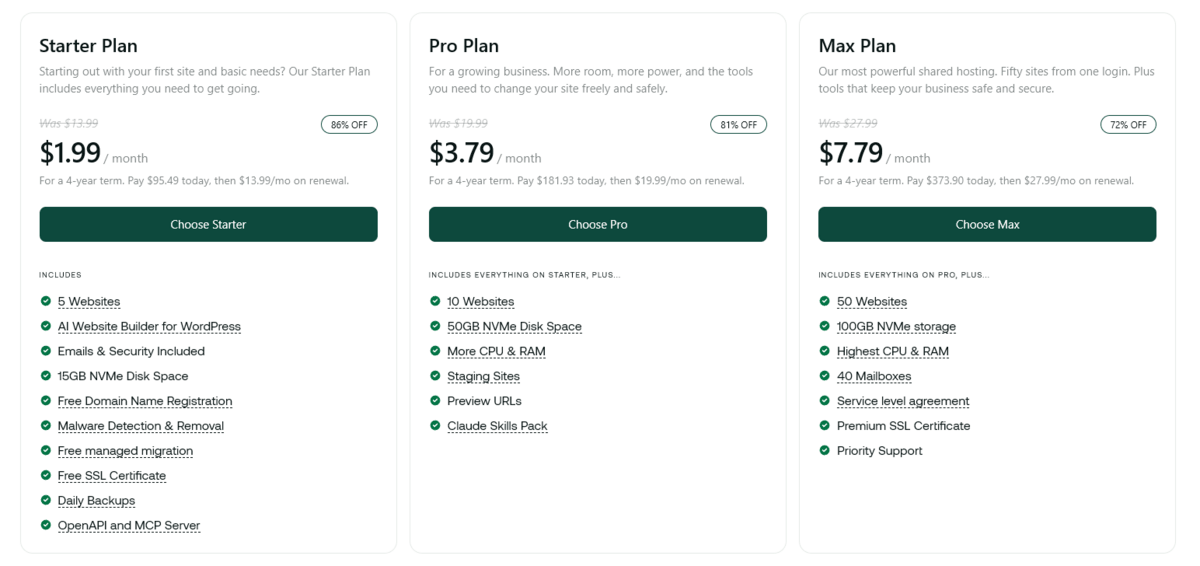
Shared hosting – Starts from $1.29* /mo
Hosting.com’s shared hosting plans start at $1.29* /month for 15GB NVMe storage, support for 5 websites, a free SSL certificate and free domain (with annual billing).
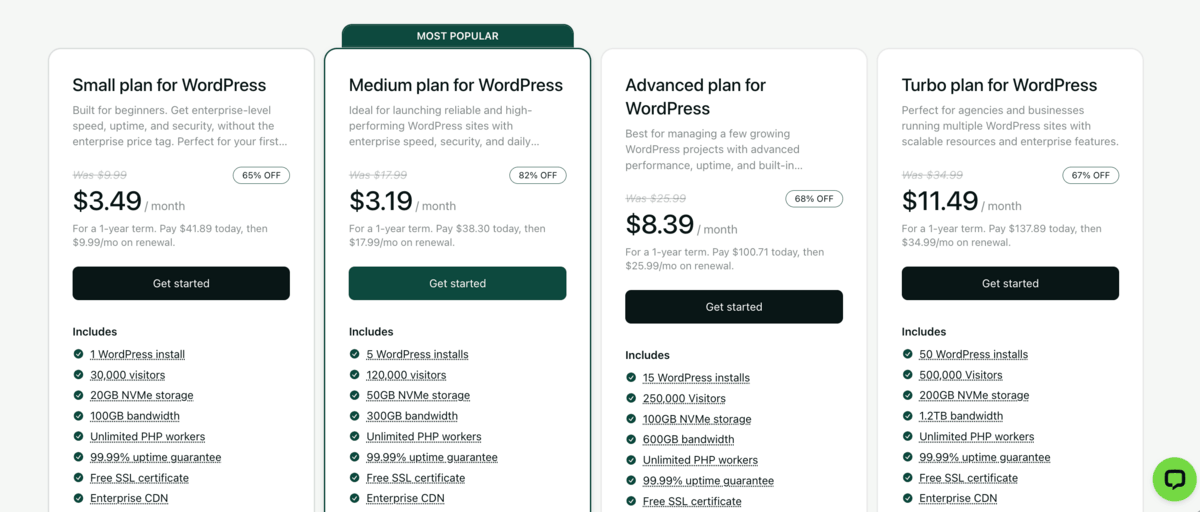
Hosting for WordPress – Starts from $3.49/mo
Hosting.com’s Hosting for WordPress plans start from $3.49/mo for 20GB NVMe, 100GB bandwidth, 1 WordPress install and free SSL.
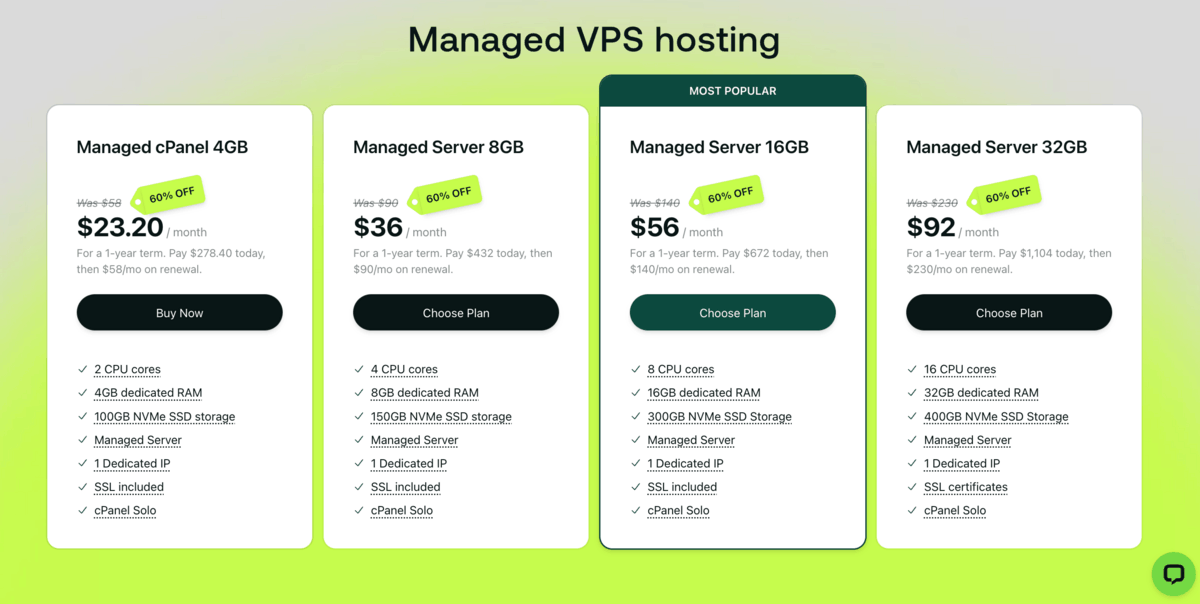
VPS hosting – Starts from $6.49/mo
Hosting.com’s VPS hosting plans cost between $6.49/mo to $92/mo depending on the level of management and the plan tier. Unmanaged VPS hosting plans start from $6.49/mo for 2 CPU cores, 4GB RAM and 80GB SSD storage.
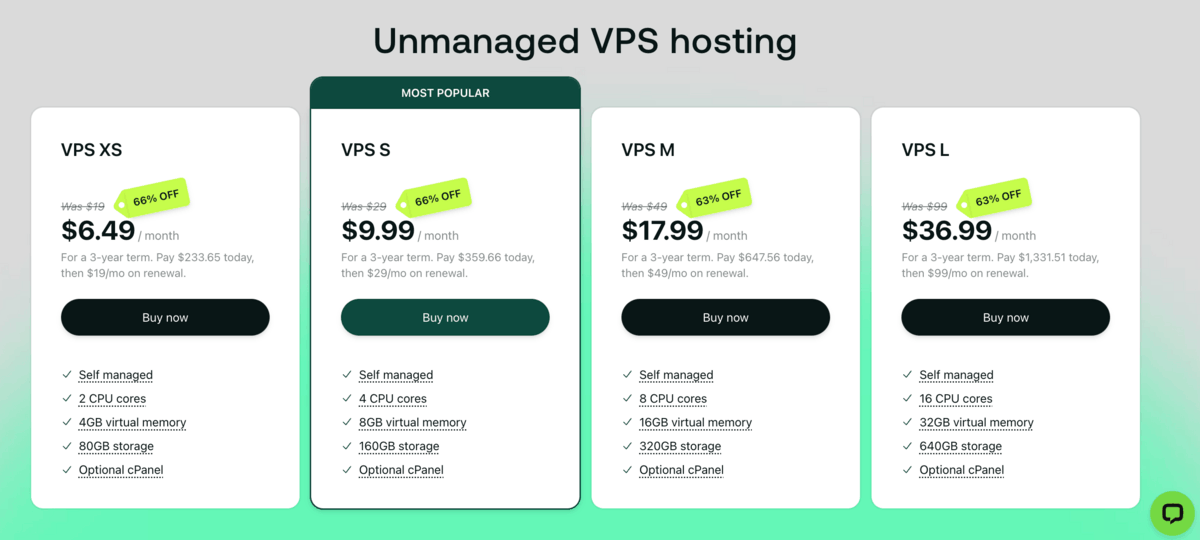
Hosting.com’s managed VPS plans start at $23.30/mo for 2 CPU cores, 4GB RAM and 100GB NVMe SSD storage.
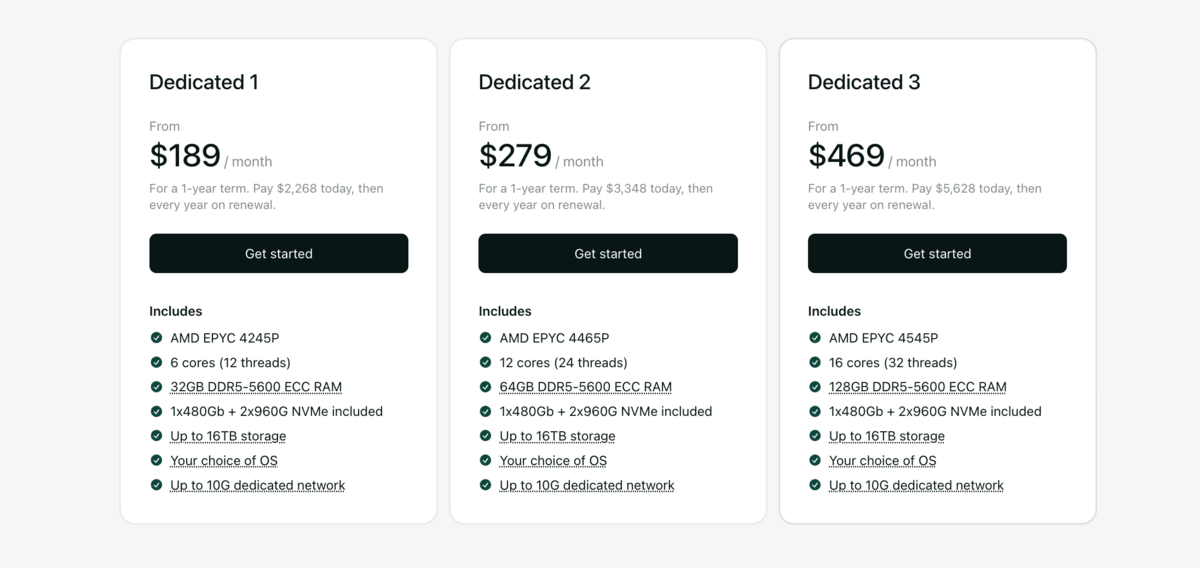
Dedicated hosting – Starts from $189/mo
Hosting.com’s dedicated hosting plans cost $189/mo to $469/mo depending on the level of management and the plan tier. Their unmanaged dedicated plans start from $189/mo for 6 CPU cores, 16TB storage and 32GB RAM.
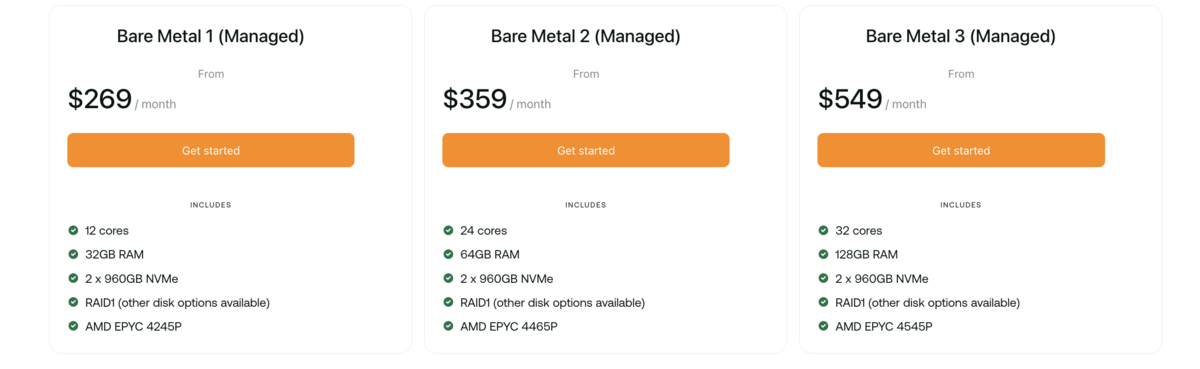
Their Managed dedicated server hosting plans start from $269/mo and include 12 cores, 32GB RAM, 2 x 960GB NVMe, and an account manager.
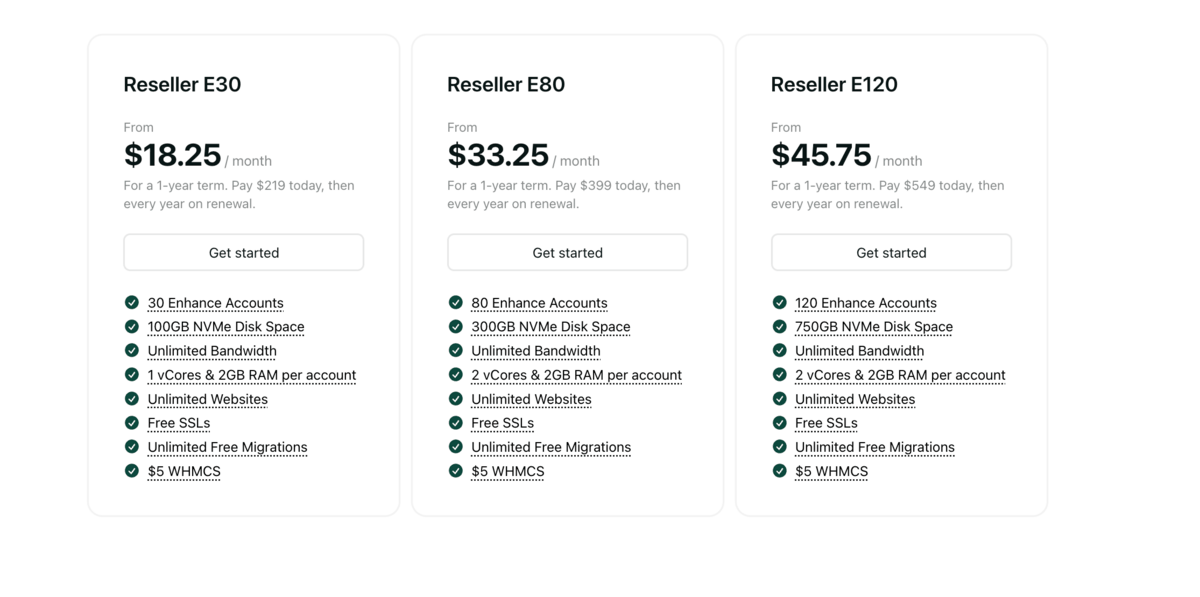
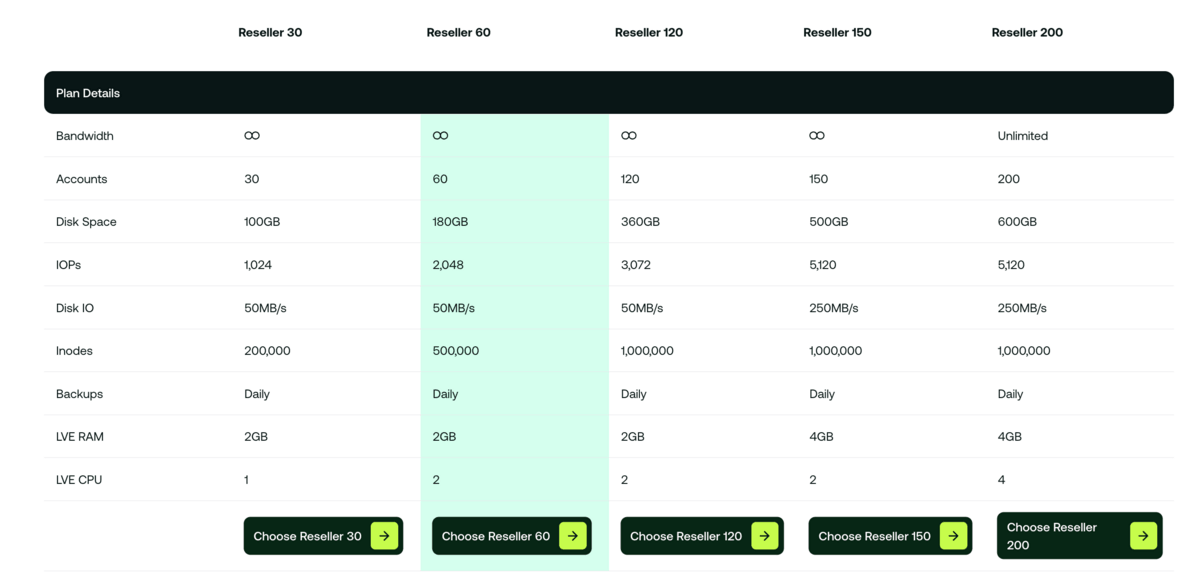
Reseller hosting – Starts from $18.25/mo
Hosting.com’s reseller hosting plans cost between $18.25/mo to $229.00/mo depending on the platform it is built on and the plan tier. Their flagship reseller plans start at $18.25/mo for 30 Enhance accounts, 100GB NVMe storage, unlimited bandwidth and unlimited websites.
Their cPanel and WHM reseller plans start at $24.50/mo for unlimited bandwidth, 30 accounts and 100GB of disk space.
Is It Better to Opt for Monthly or Annual Plans?
It is better to opt for annual plans with Hosting.com if you expect to use the service long-term and wish to get the lowest prices. Annual plans refer to hosting subscriptions paid upfront for a year or multiple years. Monthly plans are billed one month at a time. Annual or multi-year terms offer significant cost savings. For example, Hosting.com’s Starter shared hosting plan costs $13.99/month on a monthly plan compared to $1.29/month on a longer-term prepaid plan, which equates to an 91% saving. However, monthly billing offers more flexibility for short-term projects.
• Price starts from $1.29* /mo – Use code BITCATCHA
Where Are Hosting.com’s Data centers?
Hosting.com operates 8 data centers that are located in Buffalo, New York (US), Toronto (CA), Mexico (MX), London (UK), Frankfurt (DE), Singapore (SG), Sydney (AU) and Mumbai (IN). Users choose their preferred server location during checkout and are encouraged to choose a location close to their website audience to provide optimal loading speeds. Dedicated server hosting plans are hosted from their US data centers only.
How Fast Is Hosting.com?
Hosting.com delivers fast hosting performance through a combination of modern server hardware, caching, database optimization, and distributed infrastructure. Plans include NVMe SSD storage for faster data processing and retrieval and their Turbo-boosted plans utilize fast AMD EPYC processors. LiteSpeed web servers and caching are included in shared hosting, managed Linux servers, and reseller hosting plans.
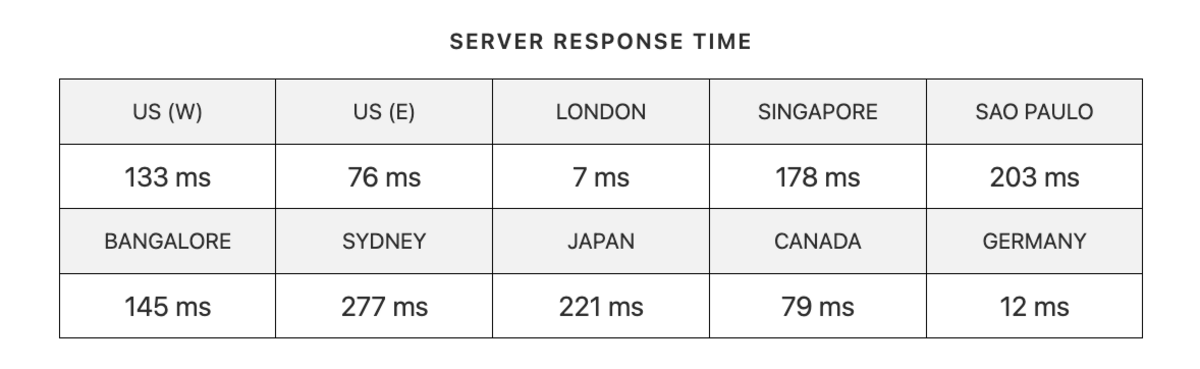
To confirm Hosting.com’s speed, we used our Bitcatcha Server Speed Checker to test multiple test sites hosted on different data center locations. Every test site achieved an excellent A+ speed rating, showing that Hosting.com delivers consistently fast server response times across its global network.
Our fastest global average server response time was an excellent 130.4 ms, recorded from a test site hosted in Hosting.com’s US data center.
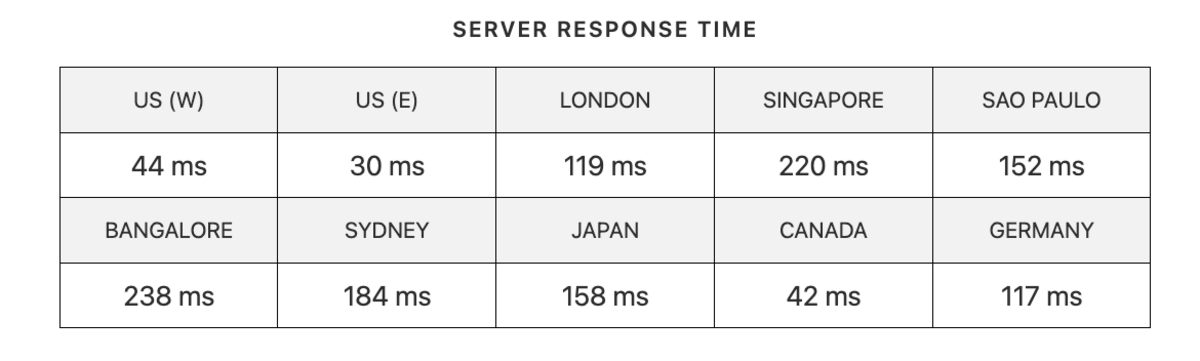
Our tests also showed the importance of choosing a data center close to your target audience. A test site hosted from Hosting.com’s Singapore data center recorded a response time of just 2 ms from Singapore and 55 ms from Bangalore, making Singapore a strong choice for websites targeting visitors across Asia and Oceania.
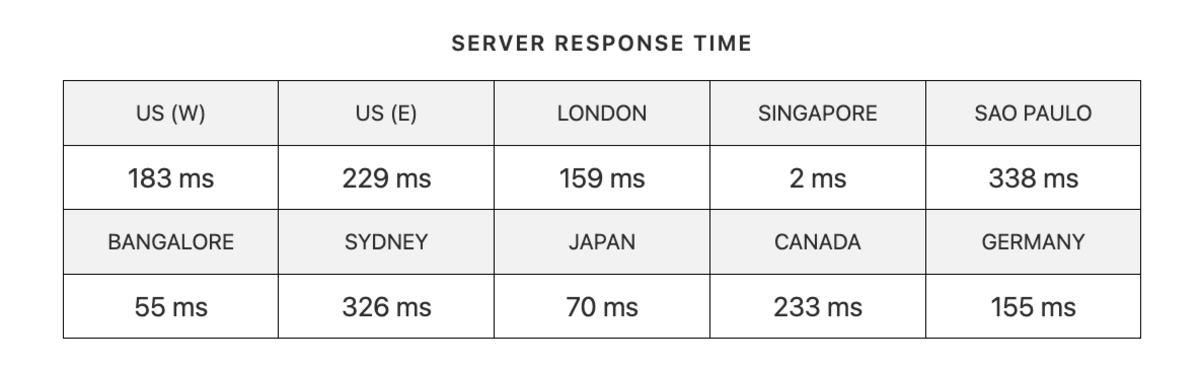
We saw similarly strong regional performance in Europe. Our test site hosted from Hosting.com’s London data center returned response times of 7 ms from London and 12 ms from Germany.
Hosting.com ensures these fast speeds by using optimized MySQL, load balancing, and high-availability architecture to improve response times and maintain performance under heavier traffic. Its cloud-based infrastructure allows hardware to be upgraded to newer generations without requiring customers to migrate their websites manually.
• Choose from 8 data centers across 4 continents
• 130.4 ms average response time, worldwide
What Is Hosting.com’s Uptime?
Hosting.com guarantees 99.9% uptime across all their hosting plans. Users are able to request service credits if uptime drops below 99.9% due to internal network or equipment failure. Eligible downtime must be verified by Hosting.com support, and credits are capped at the full monthly hosting fee. Planned maintenance and external network issues are excluded from this guarantee. Managed infrastructure, proactive monitoring, and premium hardware help maintain stable site availability.
What Control Panel Does Hosting.com Provide?
The control panel Hosting.com provides depends on the plan type. Hosting.com provides cPanel as the default control panel on their shared, Linux VPS, dedicated, and reseller hosting plans. Hosting.com provides the Plesk control panel on its Windows VPS plans. They also provide a WordPress-specific custom dashboard on their Hosting for Managed WordPress plans. They also provide specialized plans that utilize the Enhance control panel platform.
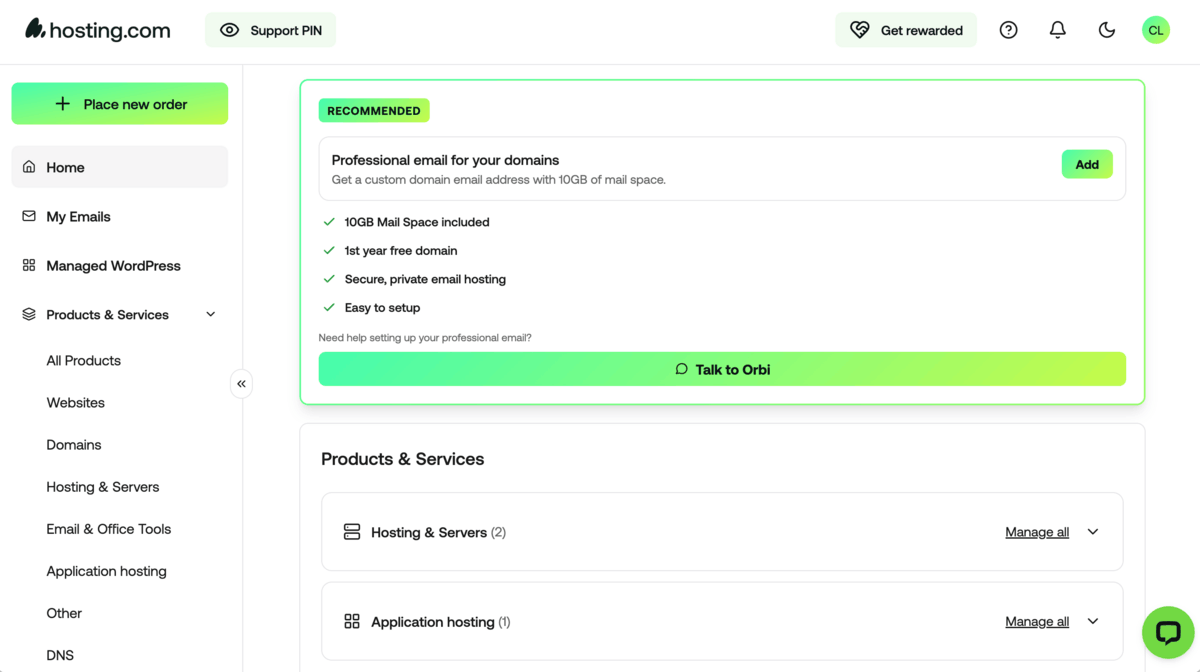
Every Hosting.com account also includes the Client Area control panel. This custom interface is clean and easy to navigate and comes in both light and dark mode.
Is Hosting.com Good for WordPress Sites?
Yes, Hosting.com is good for WordPress sites because its Hosting for Managed WordPress plans include WordPress-specific performance, security, and management features. It was built through Hosting.com’s partnership with Rocket.net and is designed specifically for WordPress rather than general-purpose hosting.
For good WordPress performance, Hosting.com includes a WordPress-tuned Cloudflare Enterprise CDN, WordPress-aware full-page caching, WP Rocket, and Object Cache Pro. For good WordPress security, Hosting.com uses Cloudflare Enterprise and Imunify360 firewalls with rules designed around WordPress and plugin vulnerabilities. For easy WordPress management, Hosting.com includes one-click WordPress staging, automatic core and plugin updates, temporary development URLs, a WordPress-focused control panel, and an AI website builder for generating and editing WordPress pages and content. All Hosting for Managed WordPress plans also include free migrations and 24/7/365 support from WordPress specialists.
Is Hosting.com Good for WooCommerce Sites?
Yes, Hosting.com is good for WooCommerce sites. Its managed WooCommerce hosting is built on Rocket.net and Cloudflare Enterprise. WooCommerce plans offer ecommerce-focused caching, database optimisation, image optimisation, and auto-scaling to help online stores stay responsive during traffic spikes. Plans also include Cloudflare Enterprise WAF protection, automatic WooCommerce updates, backups with one-click restore, free store migrations, and 24/7/365 support. Hosting.com also supports major payment gateways and provides tools such as WP-CLI, SSH, and Git for more advanced store management.
Does Hosting.com Offer WordPress Staging Environments?
Yes, Hosting.com offers WordPress staging environments across its plans. WordPress staging environments are private copies of a live WordPress website that allow users to test changes without affecting the public site. Hosting.com provides a one-click staging function that allows users to easily create a private clone of their live site to test themes, plugins, and updates before making changes public.
Can I Get Root Access With Hosting.com?
Yes, you can get root access with Hosting.com with their unmanaged VPS and unmanaged dedicated hosting plans. Root access gives users full control over their server environment, including OS configuration, software installations, and firewall rules. Hosting.com’s managed plans do not include root access because Hosting.com handles all system-level tasks for you.
Is Python Supported?
Yes, Python is supported on Hosting.com’s shared, reseller, VPS and dedicated hosting plans. Python versions 3.7, 3.8, 3.9, 3.10, and 3.11 are supported and 3.10 is the recommendation for most projects. Hosting.com’s shared and reseller hosting plans provide a Python Selector tool in cPanel that supports multiple versions for WSGI-based apps such as Django and Flask. Unmanaged VPS and dedicated hosting users have more flexibility to install custom Python environments through root access.
Is Node.js Supported?
Yes, Node.js is supported on Hosting.com’s shared, reseller, VPS, and dedicated hosting plans. Node.js versions 14, 16, 18, and 20 are supported. Shared and reseller hosting users create and configure Node.js apps through the Setup Node.js App tool in cPanel, including projects using React, Next.js, Vite, and Vue.js. Unmanaged VPS and dedicated hosting plans provide full root access for more complex Node.js applications and custom server configurations.
Does Hosting.com Come With Free Emails?
Yes, Hosting.com comes with free email accounts on their hosting plans. Email hosting allows users to create personalized email addresses tied to their domain using cPanel’s Email Accounts interface and uses part of your plan’s storage. For example, their starting Shared Hosting plans include 5 mailboxes using the standard cPanel interface. Included email features include Professional Webmail (Roundcube) to check mail in any browser, auto responders, spam filtering tools and IMAP/SMTP support. Those looking to upgrade from free email hosting have the option of purchasing a paid email hosting plan using the Titan platform. Paid email hosting includes dedicated mail space, AI-powered Smart Write, read receipts, and professional calendar tools.
• Free domain, free SSL, cPanel and root access included
Does Hosting.com Include a Free Domain Name?
Yes, Hosting.com offers a free domain name with most annual shared, Hosting for WordPress, dedicated and reseller hosting plans. The free domain is valid for the first year and includes common TLDs like .com or .net. Domain renewal fees apply after the initial term, based on the exact domain extension selected.
Is Hosting.com Secure?
Yes, Hosting.com is a secure hosting provider that offers a multi-layered approach to website protection. Plans offer SSL (Secure Sockets Layer) certificates, automated backups, and a proactive security layer through Monarx Security. Monarx offers proactive malware detection and protection by using behavioural analysis to automatically block malicious scripts from running and detecting zero-day threats.
Security features at the server level include 24/7 network monitoring and KernelCare for applying security patches. Hosting for Managed WordPress plans add further protection through a Web Application Firewall (WAF) and integration with Cloudflare Enterprise to defend against DDoS attacks.
Is a Free Hosting.com SSL Certificate Included?
Yes, every Hosting.com plan includes a free SSL certificate. An SSL (Secure Sockets Layer) certificate encrypts data transferred between your website and its visitors, thereby protecting sensitive information like passwords and payment details. Hosting.com provides SSL certificates through Let’s Encrypt and they’re automatically installed and renewed without requiring manual setup. Higher-tier plans also offer premium SSL options with added validation, warranties, and visual trust indicators for more advanced security needs.
Are Regular Website Backups Included?
Yes, Hosting.com includes regular backups on most hosting plans. Their Shared, Hosting for WordPress and managed VPS plans include automated daily backups as default. Users also have the option to run regular manual backups at any time through cPanel via the JetBackup 5 or Backuply icons in the Files section. Unmanaged VPS plans include full root access to configure custom backup schedules using cron jobs or server-side tools.
Does Hosting.com Include an AI Website Builder?
Yes, Hosting.com includes an AI website builder for WordPress across Shared, Hosting for WordPress and Reseller plans. AI website builders allow you to use prompts to generate a professional design and structure based on your specific project. Hosting.com’s AI-powered website builder is part of their proprietary WordPress dashboard called TurboHub.
How Good Is Hosting.com’s Customer Support?
Hosting.com offers 24/7 customer support through live chat, a ticketing system, and phone support. Live chat is the fastest option for quick troubleshooting, while tickets handle more complex technical issues. I tested Hosting.com’s AI-powered chatbot, OrbiAI, and found it very helpful for explaining plan features in detail. However, it was not always accurate and repeatedly told me that none of Hosting.com’s plans included an AI website builder, even though the feature was listed in the plan inclusions. OrbiAI later transferred me to a human sales representative to confirm a “specific detail,” but the representative responded to an earlier question from much earlier in the chatbot conversation. I needed to repeat my question twice before receiving a relevant answer, and the exchange took around 13 minutes. The representative did successfully resolve the question, and this may have been an isolated experience, but the transition between OrbiAI and human support could be more seamless.
Do I Get Free Website Migration?
Yes, Hosting.com provides free website migration for new customers. Website migration refers to transferring an existing website and its associated data from your current web host to Hosting.com. Hosting.com’s specialized migration team handles the transfer for you and supports platforms such as cPanel, WordPress, custom CMSs, and standard HTML sites. Hosting.com allows unlimited free migrations with no per-site fee. Your current site remains online while Hosting.com copies and tests the new version, and you’re given a temporary URL to preview it before approving the switch.
What Is Hosting.com Money Back Guarantee?
Hosting.com offers a 30-day money-back guarantee on web hosting plans. The guarantee covers hosting services only and excludes domain registrations, renewals, transfers, and third-party add-ons. Refunds are issued to your original payment method and apply to new purchases only, not renewals.
How to Cancel A Hosting.com Subscription?
Follow 6 steps to cancel a Hosting.com subscription. First, log in to your account and go to Products & Services. Second, locate the service you want to cancel and click Manage. Third, select Billing from the left sidebar. Fourth, scroll to Renewal & Subscription Settings and click Cancellation request. Fifth, choose whether you want the cancellation to take effect immediately or at the end of your current billing period. Finally, provide a reason if you wish to and then click Request cancellation. Hosting.com provides a 14-day grace period after the account is cancelled. Your data is retained during this period so you are able to reactivate the subscription if you change your mind.
What Hosting.com Deals Are There?
Hosting.com offers promotional deals of up to 91% on first-term hosting plans when the code BITCATCHA is applied upon checkout. Special deals are also frequently available during promotional periods like Black Friday, New Year, and other major holidays.
5 Hosting.com Alternatives
Alternatives to Hosting.com refer to other web hosting brands on the market that offer similar hosting services to Hosting.com offerings. 5 Hosting.com alternatives are listed below.
- Hostinger Hostinger is a Lithuania-based web host known for low introductory pricing, its custom hPanel control panel, and beginner-friendly tools. Hosting.com offers a more familiar cPanel-based environment and broader server flexibility.
- HostPapa HostPapa is a Canada-based web host focused strongly on small businesses. Its offering is broadly similar to Hosting.com, though HostPapa places more emphasis on guided support and small-business onboarding.
- WebCentral WebCentral is an Australian web host with data centres spread across 5 major Australian cities. WebCentral suits businesses targeting Australian audiences while Hosting.com offers a broader international hosting infrastructure.
- Kinsta Kinsta is a premium Hosting for Managed WordPress provider aimed at businesses, agencies, and higher-traffic websites. Its main strength is a highly specialized WordPress environment rather than the broader general-purpose hosting approach offered by Hosting.com.
- DreamHost DreamHost is a US-based web host with its own proprietary control panel and a long-standing focus on WordPress. It is a useful alternative for users who prefer DreamHost’s custom ecosystem, while Hosting.com is better suited to users who want a more traditional cPanel-based setup.
• NVMe hosting, free domain and SSL, cPanel included
• Up to 91% off with coupon code BITCATCHA
Hosting.com

From
$1.29*
monthly