

DreamHost Remixer (Remixer) is an AI-powered website and web app builder helping users create and launch browser-based projects through conversational prompts. Remixer should be used by non-technical users, business owners, entrepreneurs, freelancers, and agencies looking to build fully functional sites and apps quickly. Remixer’s pros include fast AI-assisted building, built-in backend features, integrated web hosting, and a choice of conversational and manual editing modes. Its cons include usage-based AI credits, limited code portability, and less technical control than custom development.
DreamHost Remixer works by generating a draft from a prompt, then allowing users to refine it through Chat mode or the Visual Editor before publishing it. Its agentic AI is able to plan and coordinate connected tasks such as pages, databases, user accounts, forms, and application workflows. Remixer’s features include a built-in database, storage, user management, email, server-side, analytics, SEO, and security features, with integrations for services such as Stripe and Shippo. DreamHost Remixer offers a 30-day free trial and a paid Remixer Build plan starting at $9.99/month that includes web hosting. Remixer is suitable for building business websites, booking tools, membership sites, eCommerce sites, and business web apps, but is less suitable for large publishing websites, highly complex custom applications, and native mobile apps.
- Builds websites and functional web apps from natural language prompts
- Generates initial website and web app drafts within minutes
- Includes hosting, a global CDN, SSL, and 24/7 chat and email support
- Includes built-in databases, user management, file storage, custom forms, and activity logs
- Established web hosting brand
- 30-day free trial without requiring a credit card or domain
- eCommerce integrations through Stripe and Shippo
- Offers both AI prompting and a Visual Editor for manual design changes
- Allows users to connect third-party services securely using stored API keys
- Includes built-in SEO tools
- Monthly AI credit allowance means additional usage requires extra credits
- No option to import or export code
- Not suitable for building native iOS or Android applications (browser-based only)
- Not suitable for advanced or highly customized applications
- Build functional websites and web apps from natural-language prompts
- 24/7 human support, built-in hosting, global CDN and SSL
Table of Contents
- Is DreamHost Remixer Recommended?
- What Is DreamHost Remixer?
- Who Should Use DreamHost Remixer?
- DreamHost Remixer Pros and Cons
- How Does DreamHost Remixer Work?
- What Features Does DreamHost Remixer Include?
- What Are the Plans and Pricing of DreamHost Remixer?
- What Can I Build Using DreamHost Remixer?
- What Can’t DreamHost Remixer Build?
- What Help Resources Are Available in DreamHost Remixer?
- What Are the Frequently Asked Questions About DreamHost Remixer?
- What Is the AI Model That Powers DreamHost Remixer?
- What Languages Can I Use for Prompting in DreamHost Remixer?
- Can I Import Code to Be Used on DreamHost Remixer?
- Can I Export Code Generated by DreamHost Remixer?
- What Is the Refund Policy of DreamHost Remixer?
- Can I Use DreamHost Remixer With Other Web Hosts?
- DreamHost Remixer vs Liftoff AI Website Builder: What’s the Difference?
- DreamHost Remixer vs DreamHost Hosting Services: What’s the Difference?
Is DreamHost Remixer Recommended?
Yes, DreamHost Remixer is recommended. From our tests, our favourite thing about Remixer is how quickly and naturally it turns an idea into a functional first draft that looks genuinely polished. Instead of spending hours manually adjusting layouts, copy and sourcing images, you just tell it what you want, review the drafts of your website or web app, and type back your feedback in plain English. The entire Remixer process feels more like working with a skilled designer who can also anticipate the technical steps needed to make your idea come to life.
We also like how little setup is required outside the Remixer builder itself. Hosting, SSL (Secure Sockets Layer) certificates, CDN delivery, and backend features are handled within DreamHost, so there are fewer separate services you need to configure before you push live. Larger changes are handled conversationally through Chat mode and the Visual Editor is useful for smaller manual tweaks. The latter option does not consume credits, which means you are not entirely dependent on your monthly AI allowance every time you want to make an adjustment.
The main compromise is that Remixer does not offer the same code ownership, portability, or technical control as a custom-built website or web application would. But if you’re a user who just wants to get a polished and functional website or web app online with as little friction as possible, Remixer is a fantastic option.
What Is DreamHost Remixer?
DreamHost Remixer (Remixer) is an AI (Artificial Intelligence) powered website and web app builder that enables users to create websites and browser-based applications using natural language prompts. Remixer is designed to simplify web development by generating the design, pages, and underlying functionality of a project without requiring coding knowledge. Remixer is officially marketed as an agentic AI builder because it is able to carry out multi-step website and app building tasks based on a user’s desired outcome.
DreamHost Remixer is a proprietary product from DreamHost, a web hosting provider founded in 1997 in the United States. Remixer extends DreamHost’s services beyond traditional web hosting by combining AI-powered building software with DreamHost’s existing hosting infrastructure.
Who Should Use DreamHost Remixer?
Four types of users should use DreamHost Remixer. The first are non-technical users who simply want to build functional websites fast and without coding or configuring the backend manually.
The second type are business owners who need more than a basic informational website. Remixer’s built-in cloud features (database, user management, file storage) make it suitable for businesses creating websites with customer accounts, bookings and orders.
The third are entrepreneurs and founders who want to quickly turn their idea into a working web app or MVP (Minimum Viable Product). Remixer is able to generate both the front end and backend functionality from natural language prompts, including structured data, user sign-ins, server-side actions, and eCommerce integrations.
The fourth are freelancers and agencies who build websites or digital tools for multiple clients. Remixer allows them to efficiently create both conventional websites and more functional client-facing projects, such as portals, intake systems, and file-sharing tools, without developing the backend from scratch.
DreamHost Remixer Pros and Cons
The 10 pros to using DreamHost Remixer are listed below.
- Builds websites and functional web apps from natural language prompts
- Generates initial website and web app drafts within minutes
- Includes hosting, a global CDN, SSL, and 24/7 chat and email support
- Includes built-in databases, user management, file storage, custom forms, and activity logs
- Established web hosting brand
- 30-day free trial without requiring a credit card or domain
- eCommerce integrations through Stripe and Shippo
- Offers both AI prompting and a Visual Editor for manual design changes
- Allows users to connect third-party services securely using stored API keys
- Includes built-in SEO tools
The 4 cons to using DreamHost Remixer are listed below.
- Monthly AI credit allowance means additional usage requires extra credits
- No option to import or export code
- Not suitable for building native iOS or Android applications (browser-based only)
- Not suitable for advanced or highly customized applications
How Does DreamHost Remixer Work?
DreamHost Remixer works in 3 main steps. The first step is to describe the website or web app you want to build using a natural language prompt. Users enter a simple description into the prompt box with details such as their project name, target audience, must-have pages, preferred tone and visual style, and contact information. Entering a more detailed initial prompt generally gives Remixer more context to generate a first draft that matches the intended result. To test this first step, I submitted a detailed prompt for a yoga studio website with a private membership area.
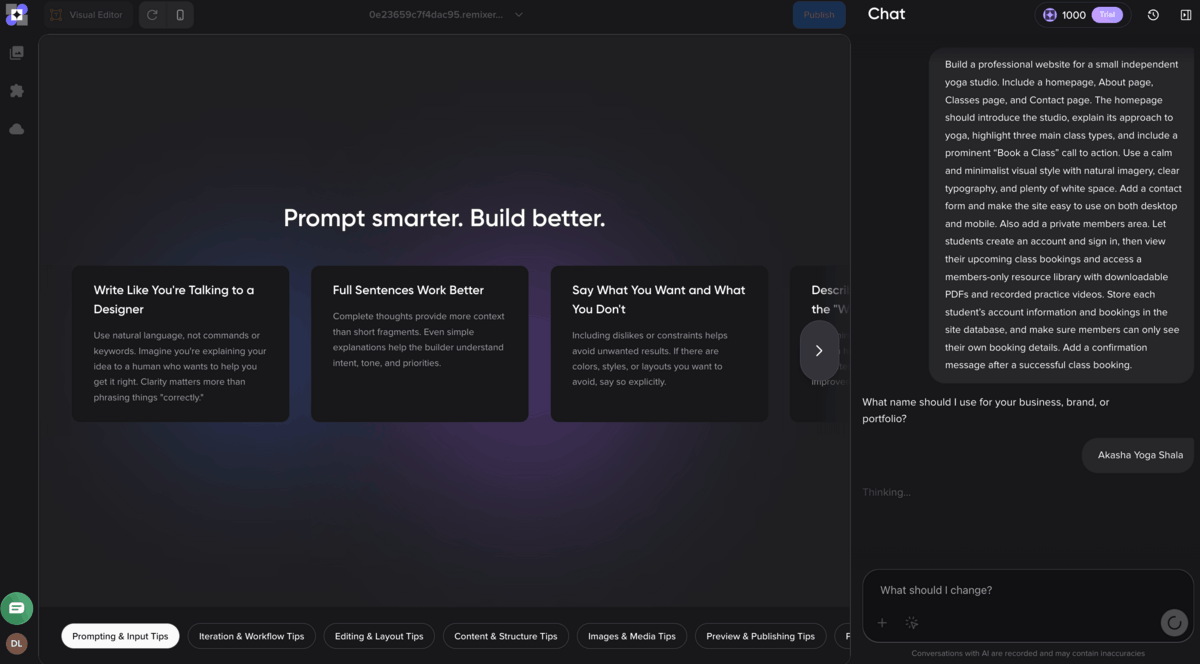
After I submitted the prompt and answered a follow-up question, Remixer generated the first draft in about 9 minutes. The result was an impressive website draft complete with an AI-generated hero video, login area, class sections, copy, and even AI-generated yoga teacher images and profiles.
The second step is to refine and customize the project. Remixer provides two editing modes that are Chat mode and Visual Editor. Chat mode allows users to request broader changes through additional AI prompts, such as adding sections, changing layouts, creating new pages, or altering the overall design. Changes through Chat Mode took a few minutes to generate and appeared directly in the live preview.
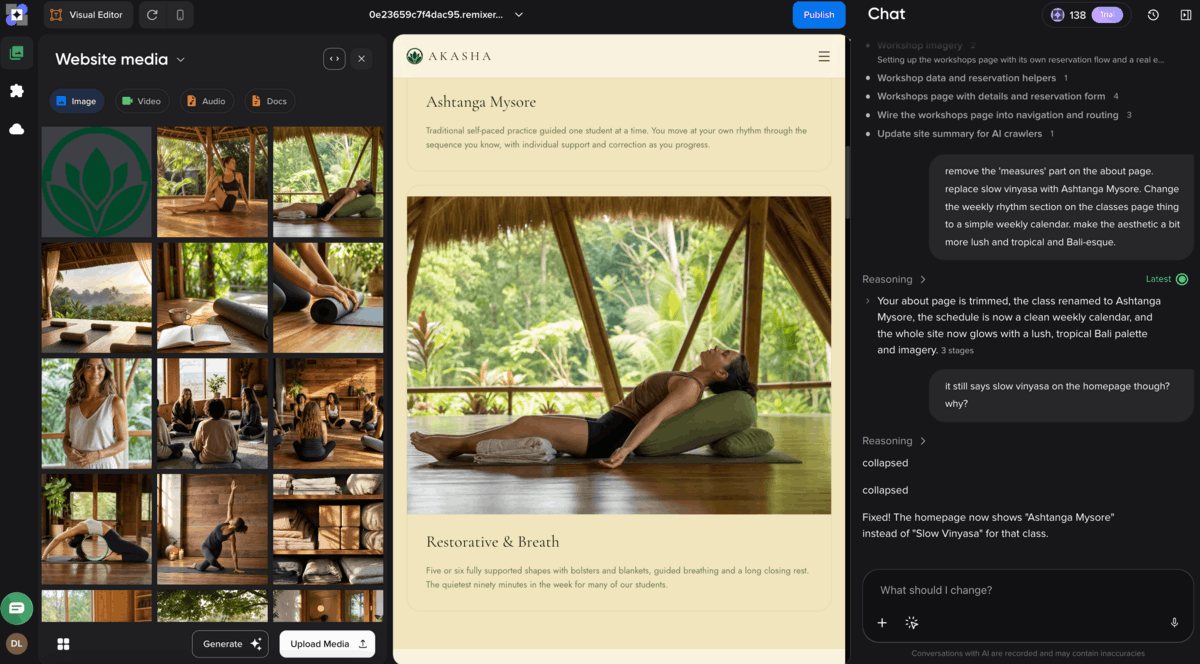
Remixer’s second editing mode is Visual Editor. The Visual Editor provides more direct manual control and provides a user experience closer to a traditional website builder.
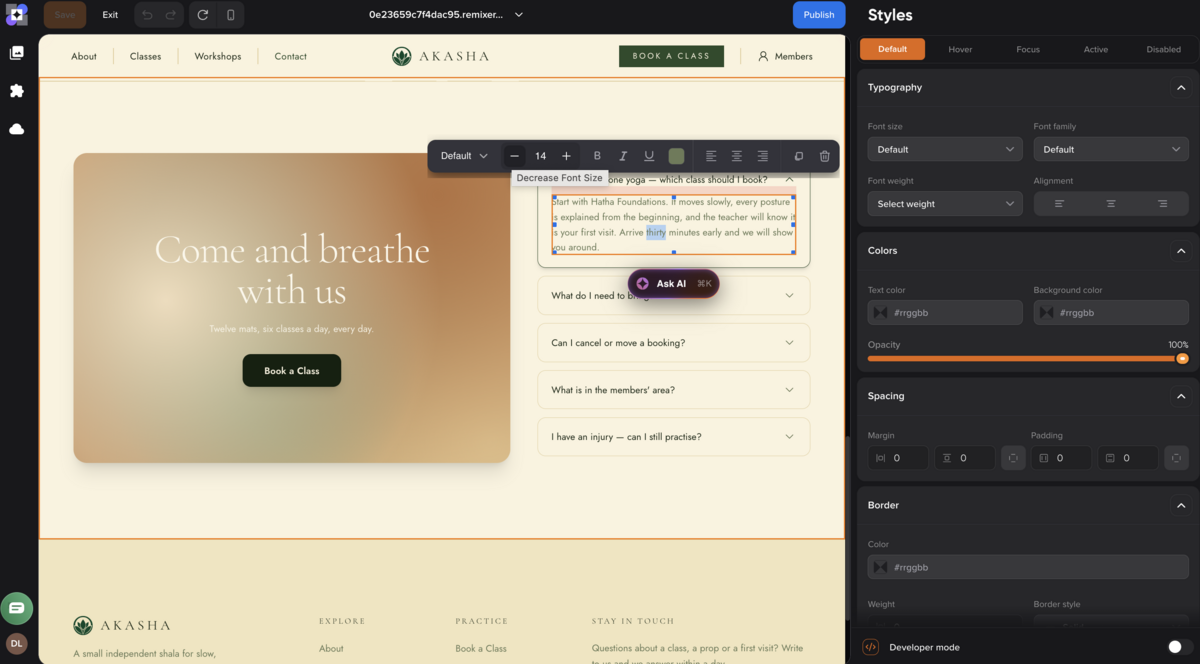
With the Visual Editor, users click individual page elements to edit text, replace images, adjust formatting, and make other targeted changes without prompting the AI. The Visual Editor is better suited to small, precise edits such as correcting copy, changing a headline, swapping a photo, or adjusting an individual section. Chat-based AI edits consume Remixer credits, while most manual changes made in the Visual Editor do not.
The third step is to publish the project. Remixer allows users to publish first to a temporary remixer.ai staging domain for testing, or publish directly to a custom live domain. Publishing to a custom domain requires a paid Remixer plan and a domain.
What Is Agentic AI in DreamHost Remixer?
Agentic AI in DreamHost Remixer refers to its ability to interpret each user’s broader goal, plan the required steps, and carry out multiple connected website or web app building tasks. Instead of only generating isolated text or design elements, Remixer is able to cleverly coordinate pages, forms, user flows, database-backed features, and payments as part of the same project. For example, a user could ask Remixer to build a client booking portal for a dental clinic, where customers create accounts, book available appointment slots, and access booking information. Remixer then creates the relevant pages, forms, database structure, user sign-ins, and connected workflows without the user needing to specify each technical component separately.
What Features Does DreamHost Remixer Include?
DreamHost Remixer includes 4 main groups of built-in features for creating and managing websites and web apps. These are data and storage features, user and communication features, backend and runtime features, and website management and security features. Most of these features are available under the Cloud section of the Remixer dashboard featured below.
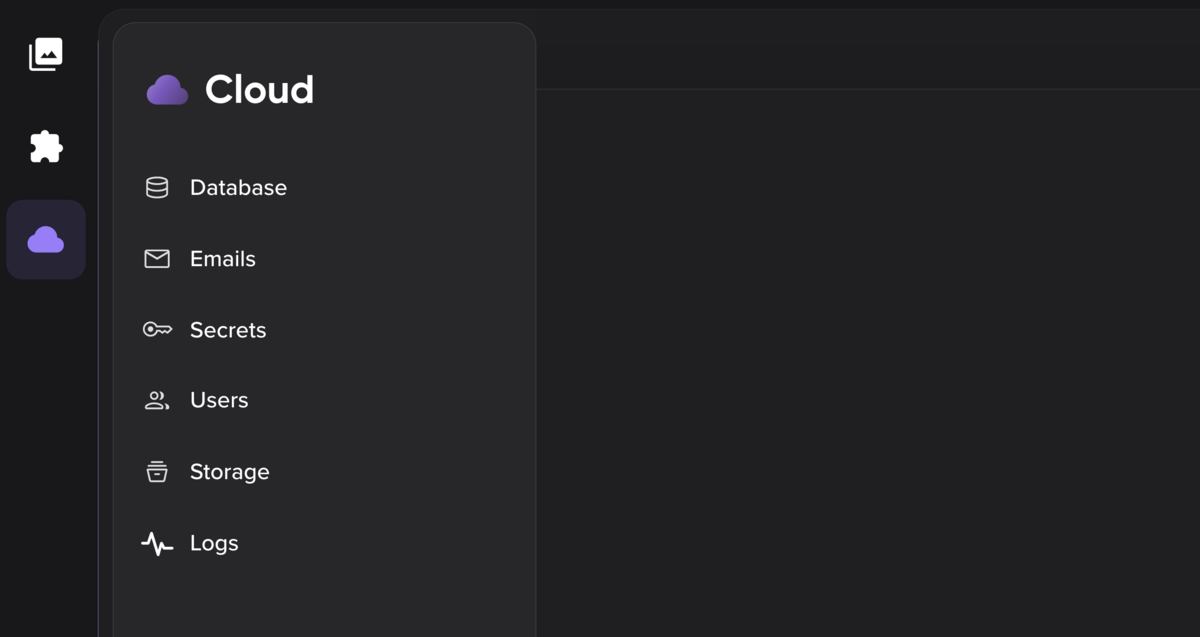
The first group is data and storage features. Remixer includes a built-in database that stores structured information such as listings, bookings, orders, user records, and form submissions. It also includes file storage for documents, images, audio, video, and other uploaded assets. Users are able to configure stored files for public or private access and apply file size limits depending on how the website or web app uses them.
The second are user and communication features. Remixer includes built-in user management that allows visitors to create accounts and sign in using email and password or Google authentication, with no stated limit on the number of registered users. It also supports custom forms, gated access for customer portals and members-only content, and transactional email. Form submissions are able to be delivered to a configured inbox without a custom domain, while sending email from a project-specific address requires a verified custom domain.
The third are backend and runtime features. Remixer supports server-side actions that perform tasks while the website or web app is running, as well as encrypted secret storage for API keys and other credentials. Secrets allow a project’s backend to connect with external APIs and third-party services without exposing sensitive credentials in the visitor’s browser. Remixer also supports integrations with external services, including built-in integrations for eCommerce functions such as payments and shipping.
The fourth are website management and security features. Remixer includes built-in analytics, SEO tools, activity logs, and SSL security. Its logs provide a record of events such as user sign-ins, data changes, and system activity, which helps users monitor a project and troubleshoot problems. Analytics and SEO tools support website performance monitoring and search visibility. SSL encrypts data transmitted between visitors and the published website or web app.
What Integrations are Available in DreamHost Remixer?
The two main integrations available in DreamHost Remixer are Stripe and Shippo. Stripe allows Remixer websites and web apps to accept credit card payments, process transactions, and manage recurring subscriptions. Shippo provides shipping and fulfillment functionality, including carrier rate comparisons, shipping label creation, and automatic tracking updates. Both Stripe and Shippo extend Remixer’s eCommerce functionality and are easily connected via the Open Integrations section of the Remixer dashboard.
What Are the Plans and Pricing of DreamHost Remixer?
DreamHost Remixer plans are priced from $0 to $14.99/mo, depending on the plan and billing cycle. There are 2 DreamHost Remixer plans. The first is the 30-day free Trial, which lets users build, edit, and preview a Remixer project without financial commitment.
The second is the Remixer Build plan, which starts at $9.99/month and includes 1,000 monthly AI credits, hosting, SSL, CDN, publishing, and 24/7 support.
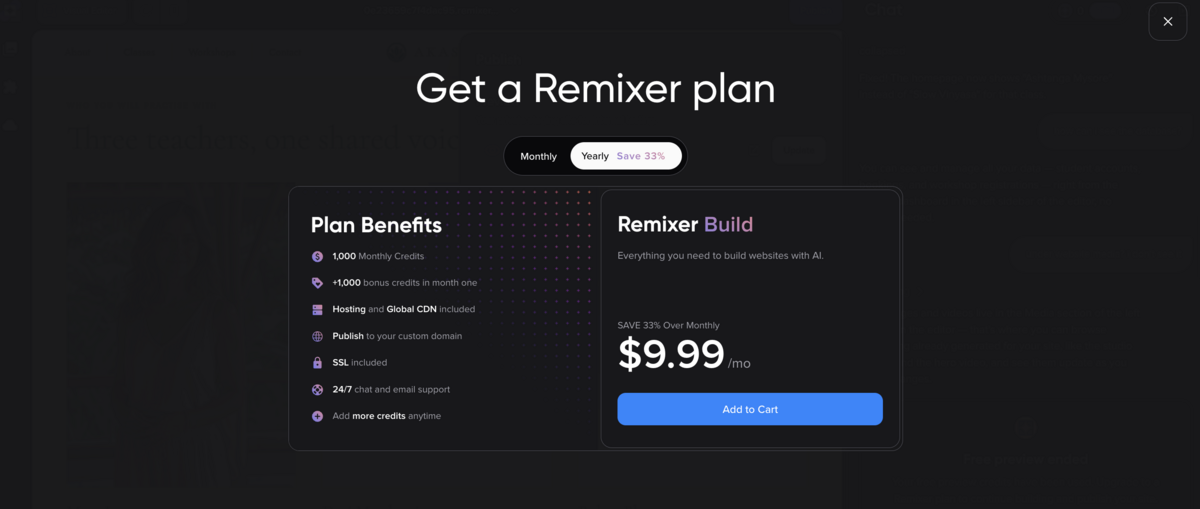
At the time of writing, DreamHost is also providing a one-time bonus of 1,000 extra credits for the first month. Users are able to choose between monthly and annual billing, with the monthly plan costing $14.99/mo after the first month’s promotional pricing elapses.
• Build functional websites and web apps from natural-language prompts
• 24/7 human support, built-in hosting, global CDN and SSL
How Does The DreamHost Remixer Free Trial Work?
The DreamHost Remixer free trial works by allowing users to build, edit and preview a new website or web app for 30 days without entering credit card details or purchasing a domain.
The free trial includes a one-time allocation of AI credits which allows them to fully test the DreamHost Remixer AI functionality and visual editor without risk. Trial projects are available on a remixer.ai subdomain that users are able to share as a staging link for client feedback before publishing. Users upgrade to a paid Remixer subscription if and when they decide to proceed with publishing the project.
How Do DreamHost Remixer Credits Work?
DreamHost Remixer credits are usage units that are consumed when users perform AI-powered actions in Remixer. Example AI-powered actions that consume credits include the generation of the first site draft, generating new images, and adding new sections. Manual changes made through the Visual Editor do not use Remixer credits. Paid Remixer plans include a monthly credit allowance of 1,000 credits. Users who need additional credits are able to purchase additional one-time credit bundles from the DreamHost panel or directly within the Remixer tool. Purchased one-time credits remain available for 6 months and are used after the monthly allowance has been depleted.
Does DreamHost Remixer Include Hosting?
Yes, the paid DreamHost Remixer Build plan includes web hosting. Web hosting refers to the infrastructure that stores and serves a website or web app so visitors are able to access it online via the internet. Remixer’s automatic integration with hosting means that users do not need to purchase, connect, or configure a separate hosting service in order to publish their project.
Remixer uses DreamHost’s existing hosting and content delivery infrastructure, which the company has developed through nearly 30 years as a web hosting provider. Every published Remixer website and web app is delivered through a global CDN (Content Delivery Network), which distributes content across 10 Points of Presence (PoPs) worldwide to improve loading speeds for visitors in different locations. DreamHost’s SmartEdge technology routes visitors through the fastest available path, while SafeHop helps keep a site or app accessible if a server issue occurs.
Does DreamHost Remixer Include A Domain?
No, DreamHost Remixer does not include a domain, even on its paid plans. A domain is the unique web address visitors use to access a published Remixer website or web app, such as remixerwebsite.com. DreamHost provides a remixer.ai staging address in order to let users build, test, and share a Remixer project, but users who want to publish their project under a custom domain must register a new domain or connect one they already own separately.
Is DreamHost Remixer Included in DreamHost Hosting Services?
No, DreamHost Remixer plans are not included by default in DreamHost’s standard hosting services. Remixer is a standalone subscription that includes its own hosting and global CDN, so users do not need to purchase a separate DreamHost hosting plan to build and publish a Remixer website or web app. Remixer should also not be confused with Liftoff, DreamHost’s separate AI website builder that is included on its WordPress web hosting plans.
What Can I Build Using DreamHost Remixer?
You can build 5 main types of websites and web apps using DreamHost Remixer.
The first are business websites and landing pages. These include company websites, portfolios, campaign pages, and simple blogs used to present information, showcase work, generate leads, or encourage visitors to take a specific action. Remixer easily generates the page structure, design, content, forms, and other site elements from prompts that describe your brand and products.
The second are booking and service tools. These allow visitors to book appointments, register for services, submit requests, or provide information online. Remixer easily generates the required forms and connects them to its built-in database.
The third are membership sites and client portals. These provide private or gated areas where registered users can access content, files, or account information. Remixer includes built-in user management, email or Google sign-ins, file storage, and gated access to support these projects.
The fourth are eCommerce and fundraising sites. These allow businesses and organizations to sell products, accept payments, manage subscriptions, or collect donations. Remixer supports these functions through its eCommerce integrations with Stripe and Shippo.
The fifth are business web apps. These include client dashboards, directories, internal tools, lightweight CRM workflows, and other data-driven applications. Remixer can generate these projects using its built-in database, user accounts, forms, file storage, and server-side actions.
What Can’t DreamHost Remixer Build?
There are three main types of projects that DreamHost Remixer is not well suited to. The first are large blogs, content archives, and multi-author publishing sites. DreamHost recommends using the WordPress platform combined with WordPress hosting for projects that rely heavily on themes, plugins, editorial workflows, or large volumes of regularly published content.
The second are highly complex applications that require advanced database querying or extensively customized backend logic. Remixer provides a built-in database and server-side functionality, but its managed no-code environment offers less technical control than a custom development stack.
The third are native mobile applications. DreamHost Remixer builds browser-based websites and web apps rather than downloadable applications for iOS or Android. Users who need software designed specifically for mobile operating systems therefore require a dedicated mobile app development platform or custom development.
What Help Resources Are Available in DreamHost Remixer?
There are 2 main help resources available for DreamHost Remixer. The first is DreamHost’s customer support channels. Remixer users have access to 24/7/365 human support through customer support chat and email via their DreamHost panel. DreamHost also provides 24/7/365 sales assistance through its website chat widget for users who need help before subscribing to Remixer.
The second is the DreamHost Knowledge Base. There are currently less than 5 dedicated Remixer articles covering the Remixer overview, credits, Visual Editor, and the process of creating and publishing a site. The Remixer knowledge base is limited compared with DreamHost’s broader hosting documentation, but covers the basic steps required to start using the builder.
What Are the Frequently Asked Questions About DreamHost Remixer?
Frequently asked questions (FAQs) about DreamHost Remixer include its AI model, prompt language support, ability to import and export code, refund policy, hosting portability, and its differences from other DreamHost services.
What Is the AI Model That Powers DreamHost Remixer?
The AI model that powers DreamHost Remixer is Anthropic’s Claude AI model. Claude is a large language model (LLM) that interprets natural language instructions and generates the content, structure, and functionality needed to build a Remixer project. A DreamHost press release from June 2026 states that the latest Remixer update uses an upgraded Claude model to improve the quality of its initial website and web app generations, though the exact Claude model version is not specified.
What Languages Can I Use for Prompting in DreamHost Remixer?
English is the recommended language for prompting in DreamHost Remixer. DreamHost does not currently publish a list of other supported prompting languages, and its customer support team confirmed that English provides the most reliable results when generating and editing website content.
Can I Import Code to Be Used on DreamHost Remixer?
No, you cannot import code to be used on DreamHost Remixer at time of writing. Remixer is designed to generate a website or web app from prompts within its own managed environment rather than act as an editor for externally-developed source code. However, Remixer does support uploading documents for the AI to use when building or editing a project. Supported file types include PDF, CSV, Markdown, and plain text files.
Can I Export Code Generated by DreamHost Remixer?
No, you cannot export code generated by DreamHost Remixer. Remixer projects run on DreamHost’s managed app platform, which differs from builders that provide a downloadable codebase for deployment elsewhere. Users who require direct ownership and portability of the underlying website files and application code should consider this limitation before choosing Remixer.
What Is the Refund Policy of DreamHost Remixer?
DreamHost Remixer subscriptions and Remixer credits are non-refundable. DreamHost’s 30-day money-back guarantee for eligible web hosting services specifically excludes Remixer, which means users are not entitled to a refund for paid Remixer subscription fees or unused Remixer credits. DreamHost instead offers a separate 30-day free Remixer trial that allows users to build and preview their project before purchasing a paid subscription.
Can I Use DreamHost Remixer With Other Web Hosts?
No, you cannot use DreamHost Remixer with other web hosts. Remixer builds and runs projects on DreamHost’s managed infrastructure and there is no current documented method for exporting a Remixer project for deployment to another web host. However, DreamHost Remixer can be configured and used with a domain that was registered under another provider.
DreamHost Remixer vs Liftoff AI Website Builder: What’s the Difference?
The difference between DreamHost Remixer and Liftoff is that Remixer is a standalone AI website and web app builder, while Liftoff is DreamHost’s AI website builder for WordPress sites. Liftoff is included with DreamHost’s WordPress hosting plans rather than sold as a standalone website builder subscription. Liftoff works within the WordPress CMS and WordPress Site Editor, with tools for AI website generation, content and image creation, design patterns, and AI-assisted editing. Liftoff focuses on generating and editing WordPress websites and does not provide Remixer’s broader agentic functionality for building connected application logic, databases, user systems, and other dynamic web app features.
DreamHost Remixer vs DreamHost Hosting Services: What’s the Difference?
The main difference between DreamHost Remixer and DreamHost hosting services is that Remixer is a complete AI website and web app creation platform, while DreamHost hosting services provide the server resources and management tools needed to host websites and applications built with a range of software, CMSs like WordPress, or custom code. DreamHost’s traditional hosting services provide greater control over the hosting environment and underlying website code, while Remixer keeps the generated project within its managed platform. DreamHost offers several hosting types, including shared hosting, Virtual Private Server (VPS) hosting, managed WordPress hosting, and Dedicated Servers, which suit users who need more control over server resources, software, or code portability than Remixer provides.
• Build functional websites and web apps from natural-language prompts
• 24/7 human support, built-in hosting, global CDN and SSL
DreamHost Remixer

From
$9.99
monthly