
tl;dr
BullVPN is a small VPN service that offers limited features beyond protocol and server location selection. You also get a kill switch, but that in itself isn’t remarkable. The small network of servers it offers shrinks further to just 10 countries if you want to use WireGuard. Overall, the price tag is at the high side. Learn more.
BullVPN is the product of a Thailand-based company called Persec. While the company appears to manage several VPN brands, BullVPN seems to be its primary focus. Persec pitches BullVPN in a rather standard manner, selling it as a safeguard for your digital privacy.
Given the highly competitive nature of the VPN landscape, it’s become increasingly rare to see new entries like BullVPN. That’s especially true when you consider the relatively steep price tag as compared to many dominant brands like NordVPN, Surfshark, and CyberGhost.
Table of contents
Advantages of BullVPN
- Very simple app design
- Modern speeds with WireGuard
- Cheap monthly price
- Flexible device connections
- Streaming and torrenting work well
- BullVPN supposedly works in China
Disadvantages of BullVPN
- The simple app has many limitations
- BullVPN’s server network is limited
- Unstable connections with OpenVPN
- Expensive long-term plans
- No-logs claim could be clearer
Conclusions
Frequently Asked Questions on BullVPN
What we like about BullVPN
1. Very simple app Design
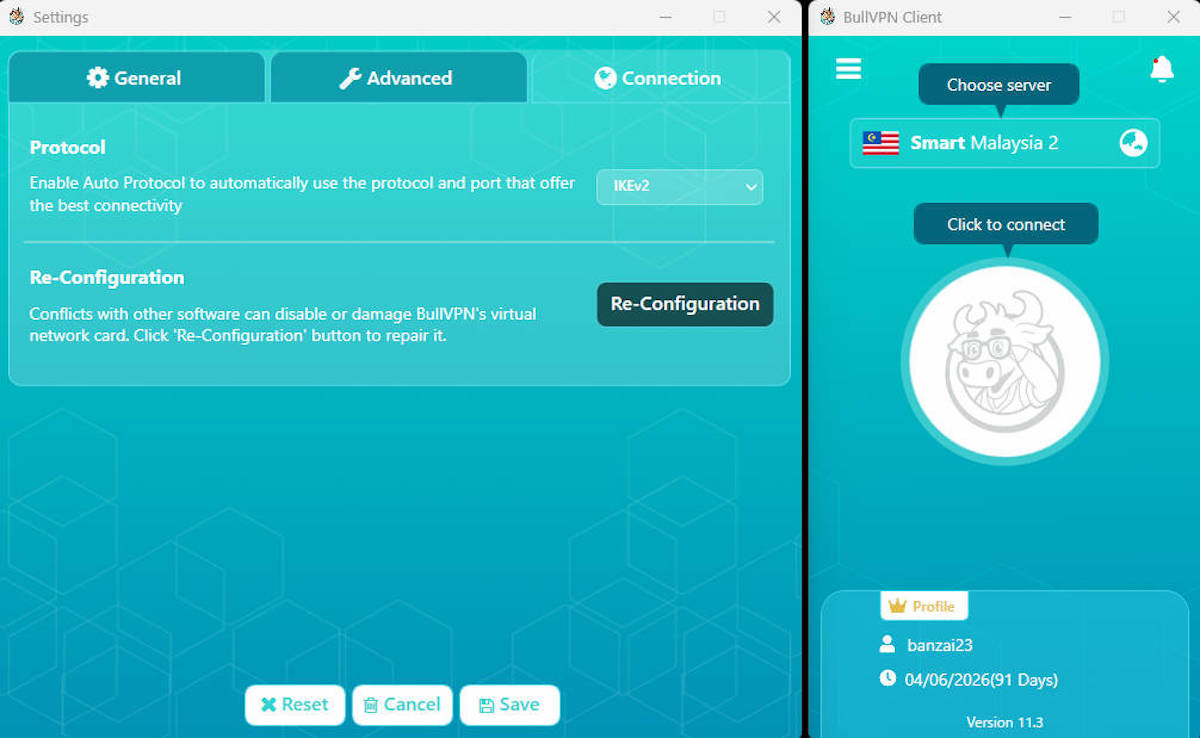
One of the best things about BullVPN is how easy it is to use. However, this mostly depends on your perspective, because its ease of use is primarily showcased by how few options the app provides. The primary app interface is dominated by a country selection button, with a “connect” button shaped like a bull’s head directly below it.
The settings menu is also pretty simple, with several “on launch” options and a protocol selection menu. The key things to note in this simple menu structure are the protocol menu and the kill switch.
2. Modern speeds with WireGuard
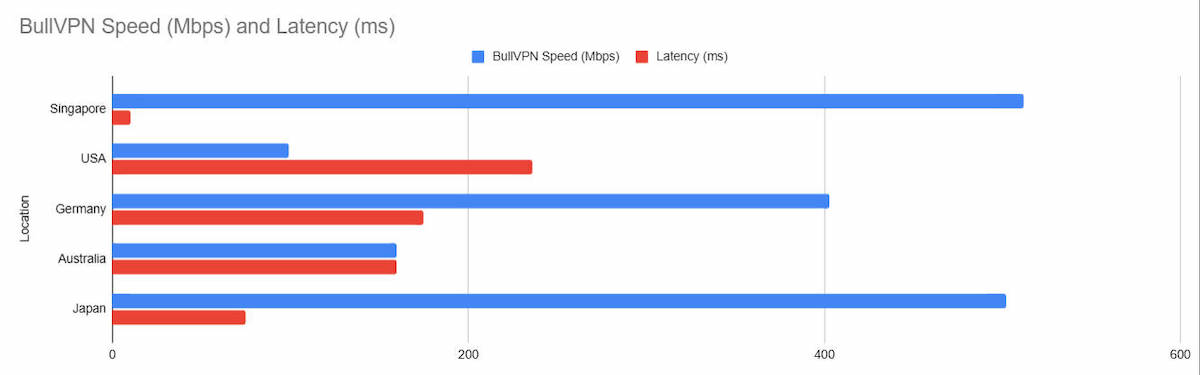
Like most VPN providers today, BullVPN does offer the WireGuard protocol. It’s lightweight, fast, and very effective. However, WireGuard seems to be either in a developmental phase with BullVPN or they are, for some reason, limiting access.
If you opt for this protocol, you can only choose from 10 server locations. Thankfully, these cover a broad geographic spread, with touchpoints in Singapore, the USA, Germany, and Japan.
3. Cheap monthly price
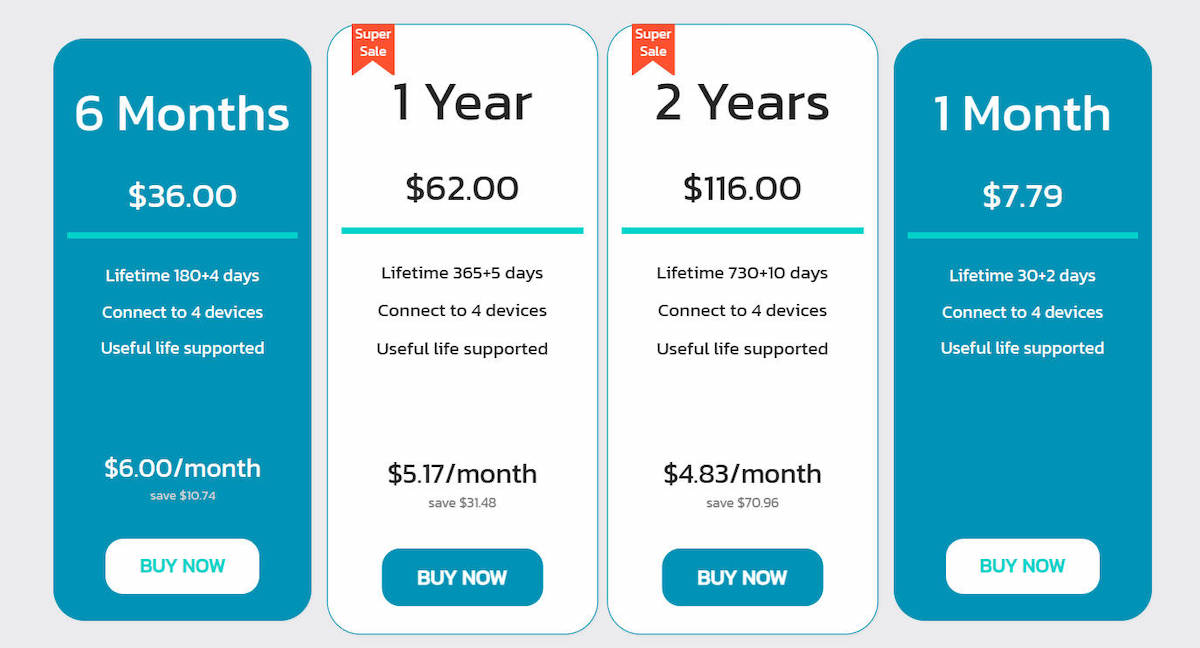
If you’ve ever shopped around for a VPN (or actually, almost any subscription-based web service), you’ll notice a similar theme. They tend to offer monthly subscriptions at sky-high prices. This helps them to sell their longer-term subscriptions at vastly discounted rates. It’s a fantastic strategy that brings potential customers on board for longer periods.
BullVPN discards this idea and prices its monthly subscriptions at decent rates. To showcase this, we compared the monthly subscription price for BullVPN against several prominent VPN brands:
| VPN Brands | Monthly Subscription Fee |
|---|---|
| BullVPN | $7.79 |
| NordVPN | $12.99 |
| Surfshark | $15.45 |
| CyberGhost | $12.99 |
As you can see from the table above, even the VPNs that we consider “cheap,” like Surfshark, come with appalling monthly subscription rates.
4. Flexible device connections
BullVPN by default allows 4 simultaneous device connections, which isn’t remarkable. Many competitors offer more. However, what is impressive is that you can increase the number of connections on BullVPN, even though you have to pay more.
While this marketing strategy isn’t a competitor-killer, it is pretty unique in the world of VPNs, where you typically don’t have many options.
5. Streaming and torrenting work well
For many VPN users, streaming different Netflix libraries is a top priority. BullVPN works for that. Connected via WireGuard to the BullVPN US server, I managed to stream Netflix US content without issues, aside from occasional buffering. However, that was mainly because my location is halfway around the world from the US, so it wasn’t BullVPN’s fault.
The one limitation I could see with streaming fants is the limited availability of the iBBC player, since there’s no UK WireGuard server for BullVPN. However, you can use OpenVPN for that, even if it isn’t at an ideal speed.
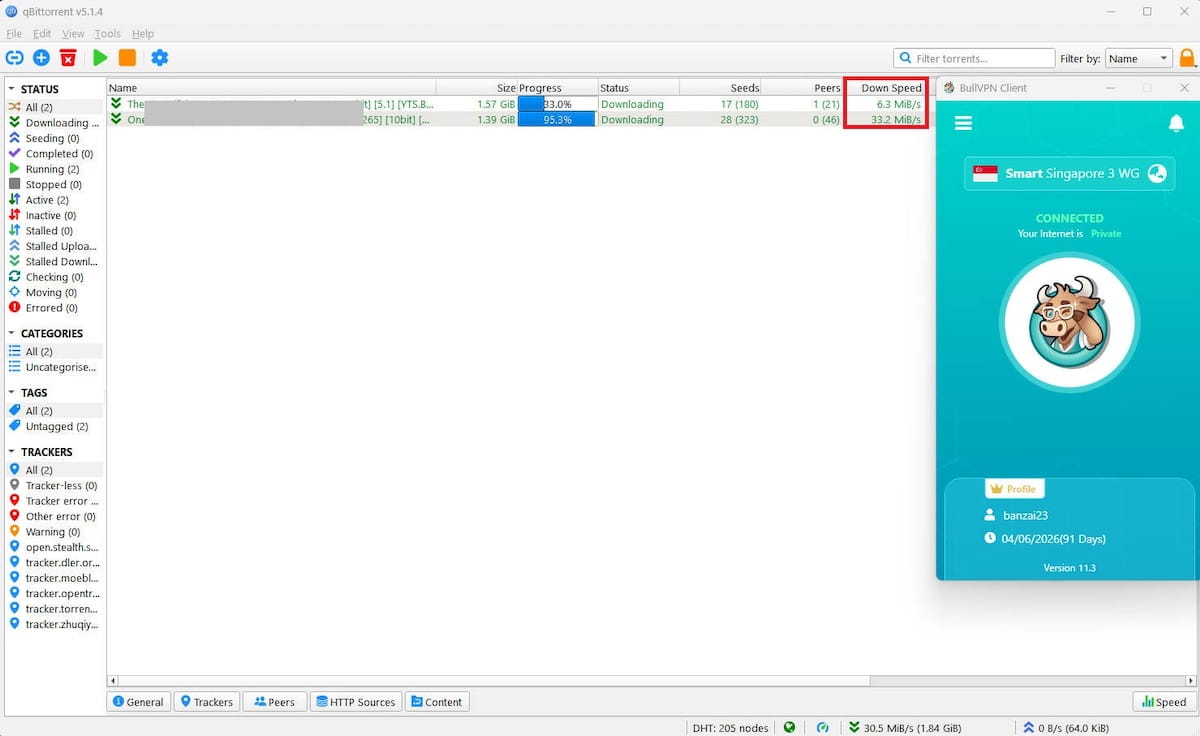
Unlike many VPN service providers that limit P2P activity, torrenting seems to work on all BullVPN servers. The speeds I got on qBittorrent were also impressive, and if you find well-seeded torrents, you should be able to get your files quickly.
6. BullVPN works in China
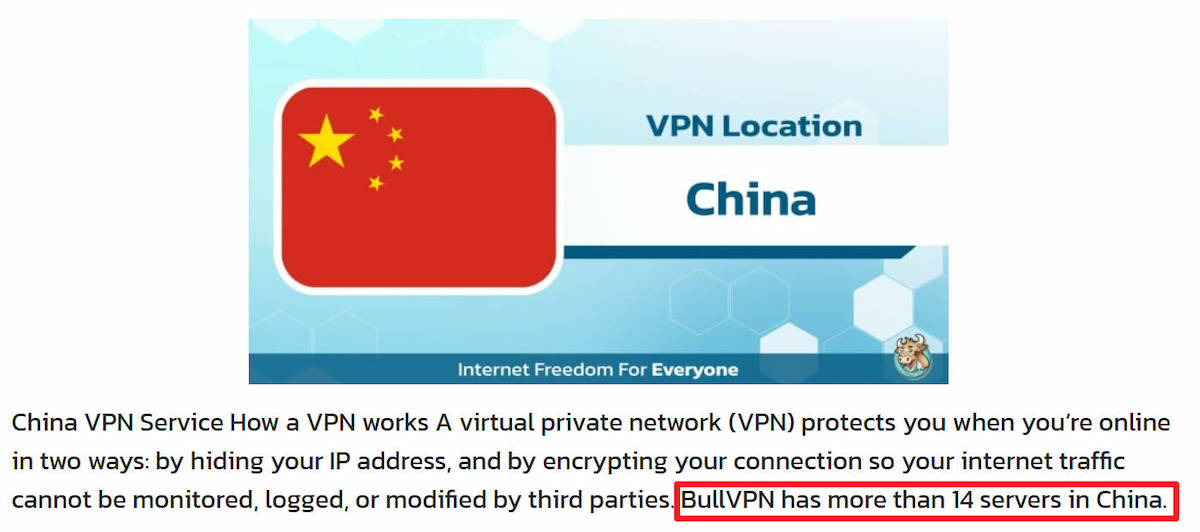
Due to increasing safeguards and constant changes, most VPN providers have given up on helping users circumvent the Great Firewall of China. BullVPN, on the other hand, seems to be one of the few remaining services that explicitly state that they work in China and have 14 servers located in the country.
• VPN servers in 49 countries including China
• Get a full refund within 7 days
What we didn’t like about BullVPN
1. The simple app has many limitations

Simple though the app may be, there are too many limitations for my liking. A lack of features can be explained as “simplification,” but these limitations extend to quality-of-life effects as well.
For example, the app can’t be resized, so your view of it largely depends on your screen resolution. On a 34″ display at 2k resolution, it was a little challenging to manage. Add to that the white text on a baby-blue background, and legibility becomes even more challenging. There’s no dark mode for the app either, so you’re stuck with that color scheme.
One even more vital shortcoming is the lack of split tunneling and limitations in internal routing detection. Without split tunneling, you’re going to have issues with some local area device connections. With BullVPN running, I could’t even connect to my home server via Remote Desktop Protocol.
2. BullVPN’s server network is limited
Call me spoilt for choice, but I’m used to VPNs that offer over a hundred server locations and thousands of servers. BullVPN offers 49 servers. That handful drops to 10 countries if you want to use WireGuard. The rest only support OpenVPN and IKEv2.
On the good side, the WireGuard servers are spread across a wide area, but since it’s already 2026, why should I have to pay for a VPN that limits me to so few WireGuard servers? The limitation doesn’t make sense unless BullVPN is dirt cheap, which it isn’t.
3. Unstable connections with OpenVPN
For some reason, I had great difficulty maintaining stable connections on BullVPN when using OpenVPN. I tried various options, including TC and UDP, but they kept disconnecting me at random.
Even though I used the “re-configuration” option, which was supposed to repair BullVPN’s virtual network card when conflicts arose, the random disconnections persisted. This doesn’t fit well with BullVPN’s claim to be a simple “click-and-use” VPN.
4. Expensive long-term plans
Earlier, I mentioned that BullVPN has excellent rates for monthly subscriptions. Unfortunately, the inverse seems to be true for their long-term plans. For those who subscribe on 2-year terms, the price does go down, but only to $4.83/mo.
Taken alone, that $4.83 isn’t very high, nor is the discount insignificant. However, when taken in context, it’s much more expensive than many other service providers. CyberGhost, for example, charges a mere $2.19/mo on its 2-year plan, less than half of what BullVPN charges.
5. No-logs claim could be clearer
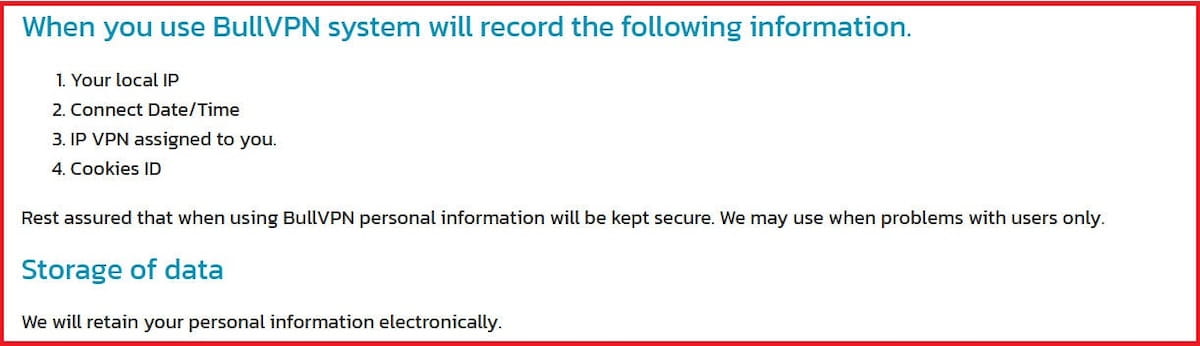
BullVPN claims to be a no-logs VPN service provider, but its privacy policy seems to contradict that claim. However, I did clarify this with them, and BullVPN explicitly informed me that it doesn’t collect or store users’ browsing history, activity, content, or usage.
What it does is collect limited operational data that may help their customer support team with troubleshooting. Any data that’s collected will be deleted in three-month cycles.
However, because of this conflict, it’s safer to say there is “limited logging” rather than a strict no-logging policy here. Further, there is no audit of any kind overseeing these logging claims, so you’ll simply have to take their word for it.
Bottomline: Is BullVPN worth a shot?
To be perfectly honest, I wouldn’t pay what BullVPN is asking, even for its two-year plan. The price is much too steep, especially when you factor in its small server network and virtually nonexistent features beyond being a basic VPN.
For those who are keen on the privacy aspect, BullVPN’s no-logging claim is also suspect, with a clear conflict between that claim and the terms spelled out in its privacy documentation, published right on its website for all to see.
Frequently Asked Questions on BullVPN
Is BullVPN a safe VPN to use?
Yes, BullVPN is safe to use for basic privacy, such as connection encryption and web browsing. BullVPN uses AES-256 encryption. This encryption still remains the current gold standard for online security.
What devices are compatible with BullVPN?
Devices compatible with BullVPN include Windows and macOS desktops and laptops, as well as Android and iOS smartphones and tablets. BullVPN is also compatible with Chrome via a browser extension.
Does BullVPN offer a free trial?
Yes, BullVPN offers a free trial. This free trial starts once you sign up and activate your account by confirming your email. From then you have a 1-day trial period with full access to the server network.
Can I use BullVPN on more than one device at a time?
Yes, you can use BullVPN on more than one device at a time. By default, BullVPN allows simultaneous conenctions form four devices per account. You can also increase the number of simultaneous connections at signup for an extra fee.
Can I choose which apps use BullVPN?
No, you cannot choose which apps use BullVPN. Once you enable BullVPN, all the data from your device is forced through the BullVPN tunnel. BullVPN does not offer split-tunneling, which allows you to segregate your web traffic.

BullVPN


From
$4.83
monthly