
Cyber Monday NAS deals are special promotional offers from NAS brands during the Cyber Monday shopping period. Check out the NAS deals that are currently live below.
top deal
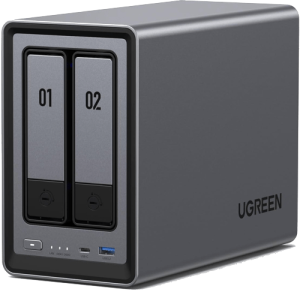
UGREEN NASync DXP2800
https://nas.ugreen.com/20% OFF, $279.99 $349.99
2-Bay, Intel N100 Quad-core CPU, 8GB DDR5 RAM, 2.5GbE, 2x M.2 NVMe Slots
| Brand | Details | Price | Avail offer |
|---|---|---|---|
UGREENLive Now | 20% OFF NASync DXP2800 | $279.99 Reg: $349.99 | |
| 20% OFF NASync DXP4800 | $439.99 Reg: $549.99 | ||
| 20% OFF NASync DXP4800 Plus | $559.99 Reg: $699.99 | ||
| 20% OFF NASync DXP480T Plus | $799.99 Reg: $999.99 | ||
| 20% OFF NASync DXP6800 Plus | $799.99 Reg: $999.99 | ||
| 20% OFF NASync DXP8800 Plus | $1199.99 Reg: $1499.99 | ||
| 20% OFF NASync DH2300 | $167.99 Reg: $209.99 | ||
| 21% OFF NASync DH4300 | $339.99 Reg: $429.99 | ||
QNAPLive Now | 21% OFF TR-004 | $174 Reg: $219 | |
| 20% OFF TS-464-8G-US | $469.99 Reg: $589 | ||
TerraMasterLive Now | 20% OFF F2-425 | $199.99 Reg: $249.99 | |
| 20% OFF F4-425 Plus | $455.99 Reg: $569.99 | ||
| 30% OFF F2-424 | $265.99 Reg: $379.99 | ||
| 25% OFF F4-424 Pro | $524.99 Reg: $699.99 | ||
| 20% OFF D2-320 | $103.99 Reg: $129.99 | ||
| TBC F4-423 | TBC | ||
Western Digital HDDLive Now | 18% OFF Red Pro 14TB | $269.99 Reg: $329.99 | |
| TBC Red Plus 6TB | TBC | ||
SeaGate HDDLive Now | 15% OFF IronWolf Pro 12TB | $229.49 Reg: $269.99 | |
SynologyTBC | TBC | TBC | See Details |
AsustorTBC | TBC | TBC | - |
* Last updated: 28th November 2025 12:00am CT
** TBC refers to “To Be Confirmed”, this list will be constantly updated as soon as we have the official deals from the provider.
What is Network Attached Storage (NAS)?
In the past, Network Attached Storage (NAS) was a pretty niche category of hardware and beyond the budgets of most regular users. However, nowadays, they’re becoming an increasingly affordable and popular way for homeowners and businesses to store, retrieve and protect data.
When we think of data storage, many people think of two main categories:
- Local data storage solutions that are within physical reach – like external hard drives.
- Cloud-based storage solutions, such as pCloud, Sync.com, or Google Drive.
NAS falls somewhere in-between these two. You can think of NAS as a hard drive connected to a specific network, or, as a private form of cloud storage. NAS allows you to store and retrieve data via a centralized connection.
Here are some NAS characteristics in a nutshell:
- Designed for multi-device access
- Connected to networks
- Functionally independent
- Cost varies widely
What are NAS used for?
Owning a NAS device lets you basically store your important data in a safe, reliable and cost-efficient way. This has obvious benefits for small business owners looking to set up a centralized storage area for employees. However, they’re also ideal for home users who are looking for a way to back up their data.
Beyond storage – most NAS units can install and run various server-type applications. One popular use of home NAS is to use them as media servers using third-party applications like Plex.
Here are just some example uses that NAS can be helpful for (in reality, the list is endless!):
- Backing up photos and videos
- For freelancers to back up their working files
- Setting up automated backups
- Letting employees collaborate and access files remotely
- Setting up media servers using third-party applications like Plex
What are the benefits of using NAS?
NAS are popular for their many advantages:
- They’re an ideal way to boost the storage space available on laptops and computers.
- It’s easy to scale up: you can add and configure additional hard drives when needed.
- They’re a private form of cloud storage, enabling more control and privacy.
- They’re highly customizable and easy to set up. See our NAS setup guide for more information.
- They’re great for flexible remote access, allowing you to access files from anywhere.
- Multiple people can access the same files on the same network.
- Can connect to multiple devices, including things like USB cameras and printers.
- A cheaper and more space-efficient alternative to larger servers. Most NAS don’t take up a lot of physical office space.
In all, NAS can be invaluable for business and personal use. Whilst more expensive than traditional cloud storage, NAS comes with special advantages. They’re one of the best and most cost-efficient ways to secure large amounts of storage in the long-term.
What are the considerations for getting a NAS?
When you’re buying a NAS for yourself, there are a couple of considerations to think about.
- How much processing power (cores) do you need?
- How much RAM do you need?
- What kind of network interface does it support?
- What hard drive brands are supported? (here’s our guide to the best hard drives for NAS)
- How many drives do you want your NAS to support?
- What software do you want to use on your NAS?
If you’re struggling to pick a NAS, make sure to check out our in-depth review on the best NAS devices for home users.
How does NAS differ from DAS?
Whilst Direct Access Storage (DAS) like external hard drives are great for storing and backing up data, NAS can do much more. NAS units come packed with much more hardware and advanced features. Besides storage drives, NAS will also generally include:
- Dedicated processors
- Memory
- An independent NAS-specific Operating System (OS).
This combination allows NAS to offer powerful features independent of the devices which connect to it. They can even connect to network interface devices like routers, which lets multiple devices access them simultaneously.
Be sure to take advantage of the Black Friday deals and get your NAS device!